Your company's first formal declaration, with a specialist walking you through it for free
In one sentence: what is free and what is still charged?
HowBridge offers free specialist coaching for a company's or registered business's first commercial sea express formal customs declaration: assessing your products' import regulations, teaching you to complete exporter/importer registration and long-term authorization, fill in the packing list, invoice and power of attorney, and download the declaration and tax documents from the "Tax documents" page for your books. The customs declaration fee of NT$800, freight and taxes are still charged; the declaration itself is filed by HowBridge's partner customs broker.
This page explains what HowBridge's free coaching for a company's or registered business's first formal declaration includes, which fees are still charged, and the 6-step process. HowBridge currently only provides mainland China → Taiwan consolidated shipping (Shenzhen consolidation warehouse and Taoyuan Dayuan operations warehouse); HowBridge's business registration does not include customs brokerage, HowBridge is not a customs broker, and the formal declaration is filed by HowBridge's partner customs broker on a general import declaration. The guidance on this page describes the process and is not legal or tax advice; the tax amount and clearance method are determined by Customs.
Who should apply for free coaching on their first formal declaration?
Companies or registered businesses with a Taiwan business uniform number (tax ID) that, for the first time, want to formally declare goods imported from mainland China in their own company's name and need the import declaration and tax documents for their books. Individuals can also choose formal declaration at HowBridge, but the specialist coaching in this program covers a company's or registered business's first declaration. The four common cases are:
| Who you are | Why the first shipment should be formally declared in the company's name | What to have before you start |
|---|---|---|
| Brick-and-mortar shop owners (clothing, general goods, stationery, home décor, hardware) | Purchases must be booked, and you need an input-tax voucher to deduct the 5% business tax (VAT); a simplified declaration in an individual's name does not give you a payment certificate deduction copy showing the uniform number | Company or business uniform number, company seal and responsible person's seal |
| Online sellers (Shopee, momo, Coupang, own website) | Platform reconciliation and income tax filing both need cost-of-goods vouchers; high-value express cargo with a customs value over NT$50,000 must use a general import declaration anyway | Uniform number, seals, product list with unit prices |
| Live-stream sellers, group-buy organizers | Single sessions move large volumes, and one batch often exceeds NT$50,000; you issue invoices to customers after collecting payment, so purchases also need vouchers | Uniform number (a personal studio can first complete business registration), product list |
| YouTubers, creators (merchandise, equipment, samples) | Own-brand merchandise is for sale, so the personal-use standard does not apply; equipment has high unit prices and is often subject to mandatory inspection | Uniform number, the products' CCC codes (Taiwan's 11-digit tariff codes) and import regulation codes |
- Can individuals apply? Yes. HowBridge's formal declaration is not limited to companies, and the customs declaration fee for individuals is also NT$800; exporter/importer registration is only for companies and registered businesses, individuals are not among the organization types in the registration system, and individuals can authorize either online via EZ WAY or with a paper case-by-case power of attorney. The specialist coaching on this page is for a company's or registered business's first declaration.
- No uniform number yet? A registered business (business registration) is set up with the special municipality or county/city government where it is located, and a company is registered with the Ministry of Economic Affairs (Taiwan); come back and apply once that is done, or place a trial order as an individual first.
- You can sign up before buying the goods. The specialist first assesses the 11-digit tariff code and import regulations from the product name and pictures, so you do not buy something only to find out it needs inspection or is not allowed in.
Which 7 things does the free coaching include?
The 7 items below plus 1 private AI assistant lesson are taught to you free of charge, one-on-one on LINE by a HowBridge specialist during your first commercial sea express formal declaration, with a video call when needed; these are services that consultancies or agents usually charge for. The specialist teaches you how, where and what to fill in; applications and submissions are completed by your company with its own certificate and seals.
① Specialist assessment of your products' import regulations
You give the product name, material, use and store link; the specialist looks up the 11-digit CCC code, the Column 1 duty rate and the import regulation codes (for example MW0 mainland China goods not permitted, C02 subject to mandatory inspection, F01 food import inspection, MP1 conditionally permitted) and tells you first whether this batch can be imported and whether inspection or a permit must be applied for in advance. The tools are Tariff lookup and Import tax estimator; the conclusion is subject to Customs' determination.
② Which agency to apply to for what
Exporter/importer registration goes to the International Trade Administration, Ministry of Economic Affairs (Taiwan); commodities subject to mandatory inspection to the Bureau of Standards, Metrology and Inspection (BSMI, Taiwan); food, cosmetics and medical devices to the Taiwan Food and Drug Administration; radio products to the National Communications Commission (NCC, Taiwan); mainland China goods import regulations are published by the International Trade Administration. The specialist lists which of these you need and in what order, based on your products.
③ How to complete exporter/importer registration
To run import and export business in its own name, a company or registered business first registers online in the International Trade Administration's Exporter/Importer Registration System: log in with the MOEA business certificate or an account and password, run the English name pre-check first (official processing time 3 working hours), then click new registration; the rest is reviewed automatically by the system. The specialist helps you prepare the English name and watches you fill it in until you submit; see the exporter/importer registration guide for the steps.
④ How to set up online long-term authorization
On the Customs-Port-Trade Single Window (Taiwan), use the MOEA business certificate to set up online long-term authorization (WJA02); after that you no longer attach a power of attorney for each declaration. The specialist tells you what to prepare: card reader, certificate card and PIN, the components the website asks you to install, the partner customs broker's box number and customs district, and how to fill in the start and end dates; see online long-term authorization for the steps.
⑤ How to fill in the packing list and commercial invoice
Use HowBridge's Excel template (two worksheets, packing list and invoice) and fill in each field: shipper, declarant (your company), product description, quantity, unit, unit price, currency, net and gross weight, country of origin. Before you submit the consolidation order the system checks every field and lists anything missing; mistakes can be corrected and re-uploaded.
⑥ How to fill in the case-by-case power of attorney
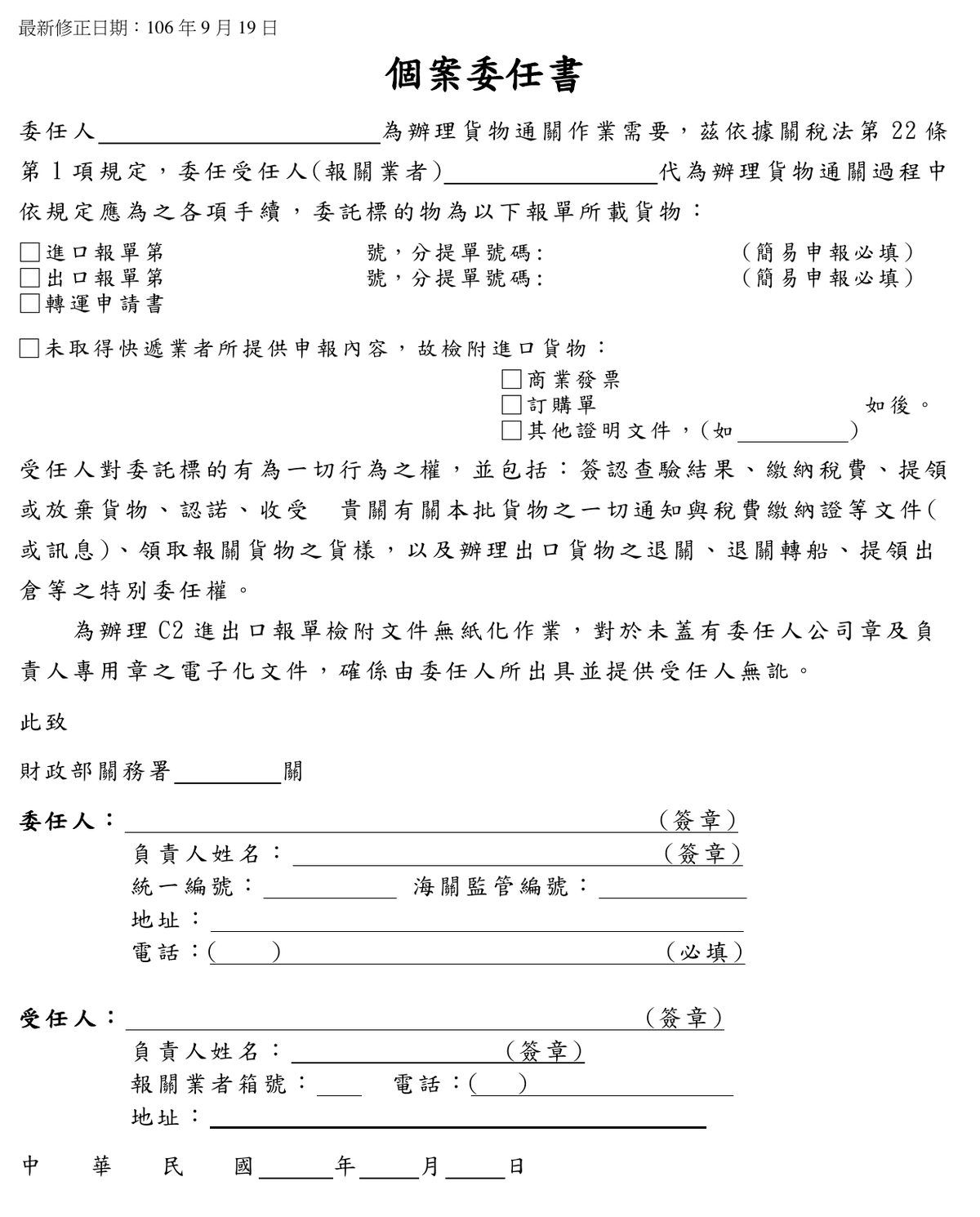
If long-term authorization is not completed for the first shipment, use the Customs Administration's official case-by-case power of attorney form: principal (your company), agent (the partner customs broker), declaration or house bill of lading number, company seal and responsible person's seal, uniform number, date; one form per shipment. The specialist tells you which boxes you fill in, which the customs broker fills in, and which seals to apply.
⑦ How to download tax documents and the import declaration for your books
After clearance, the import declaration and the customs-collected business tax (VAT) payment certificate appear on the "Tax documents" page in the HowBridge member center; the specialist shows you how to filter by company and month and download them, and which one your accountant uses to deduct input tax and which goes into cost of goods when filing Form 401.
+ Private AI assistant lesson: connect formal declaration to AI
One-on-one, we teach you to connect an MCP-capable AI assistant such as Claude or ChatGPT to the HowBridge member edition: with your authorization, the AI looks up tariff codes and import regulations, creates parcel forecasts, generates the packing list and invoice, submits the formal-declaration consolidation order and checks document status. The declaration is still filed by the partner customs broker; the power of attorney, seals and payment must be handled by you personally on the website.
Which fees are still charged, and roughly how much should you prepare for the first shipment?
Coaching is free; what is still charged is the customs declaration fee of NT$800 (per formal declaration), commercial sea express freight (NT$55 per unit from 2026-11-11), the taxes determined by Customs and the tax advance handling fee. Taxes for a formal declaration must be prepaid and can only be paid through HowBridge's collect-and-pay service; the declaration fee, advanced taxes and handling fee are settled by bank transfer, while the freight on the same bill can still be paid online.
| Item | Amount | Notes |
|---|---|---|
| Specialist coaching, teaching, templates, private AI assistant lesson | NT$0 | Free under this program; the guide pages, templates and AI assistant remain available afterwards |
| Customs declaration fee | NT$800 per formal declaration | Appears on the bill as "customs declaration fee" when you choose formal declaration; not charged for simplified declaration |
| Commercial sea express freight | NT$55 per unit | The billing unit is the greater of actual weight (kg) and volumetric weight (length × width × height in cm ÷ 10000); effective from 2026-11-11, parcels consolidated before then keep the previous rate |
| Import taxes and fees | As determined by Customs | Customs duty = customs value × duty rate; business tax (VAT) = (customs value + customs duty + commodity tax) × 5%; trade promotion service fee = customs value × 0.04%, waived if NT$100 or less |
| Tax advance handling fee | Shown before you submit the consolidation order | Taxes for a formal declaration can only be paid through HowBridge's collect-and-pay service; the tax amount is determined by Customs |
| Last-mile home delivery in Taiwan | See the shipping rates page | Formal declaration is home delivery only, convenience-store pickup is not accepted; consolidation and packing at the Shenzhen warehouse are free, with 366 days of free storage |
- Payment method: the customs declaration fee, advanced taxes and handling fee are paid by bank transfer; the billing page shows the remittance details, and the bill is settled once accounting confirms receipt. Freight can be paid online, and an e-invoice is issued automatically after payment.
- Statutory payment deadline: Article 43 of the Customs Act (Taiwan) requires taxes to be paid within 14 days from the day after the payment notice is served; for HowBridge's formal declaration, the customer prepays and HowBridge pays Customs on their behalf.
- Will the freight change? The current figures on the shipping rates page and in the announcements prevail; the figures on this page were verified on 2026-11-09.
From sign-up to bookkeeping: how do the 6 steps of your first formal declaration go?
Step 1: sign up on LINE. Step 2: the specialist assesses your products and company eligibility. Step 3: complete registration and authorization. Step 4: once the goods reach the Shenzhen warehouse, submit the formal-declaration consolidation order and upload the documents. Step 5: sea express clearance, tax prepayment and home delivery. Step 6: download the declaration and tax documents from the "Tax documents" page for your books. The specialist is on LINE at every step, with a video call when needed.
1Sign up on LINE and tell the specialist about your company and products
Tap "Sign up one-on-one on LINE" on this page; the message "I want to apply for free coaching on my company's first formal declaration" is pre-filled. Add your company name, uniform number, main products and expected quantities. You can sign up before buying the goods.
2The specialist assesses import regulations and company eligibility
The specialist looks up each product's 11-digit tariff code, Column 1 duty rate and import regulations and tells you whether inspection or a permit must be applied for first, and also checks whether your company has exporter/importer registration and an MOEA business certificate.
3Complete exporter/importer registration and long-term authorization
A company without registration first registers online in the International Trade Administration's Exporter/Importer Registration System; a company with an MOEA business certificate sets up online long-term authorization on the Customs-Port-Trade Single Window, and one without it uses a paper case-by-case power of attorney for now. Both are completed by your company with its own certificate and seals, with the specialist guiding you through the forms.
4Goods arrive at the Shenzhen warehouse: submit the formal-declaration consolidation order and upload documents
On the consolidation screen choose "Formal declaration" and commercial sea express, then upload the packing list + invoice (.xlsx) and the power of attorney; the system checks the packing list and invoice field by field, and a scanned or photographed power of attorney goes to manual confirmation. Formal declaration allows home delivery only.
5Sea express clearance, tax prepayment, home delivery
The goods clear customs through the sea express cargo zone, and the partner customs broker files a general import declaration; once Customs determines the taxes they are added to your bill, you prepay the declaration fee, taxes and handling fee by bank transfer, and the freight can be paid online.
6Download the declaration and tax documents from "Tax documents" and hand them to your accountant
On the member center's "Tax documents" page, filter by company and month and download the import declaration and the customs-collected business tax payment certificate; when filing Form 401, your accountant reports the input tax with the deduction copy of the payment certificate, and the customs duty goes into cost of goods.
How do you complete exporter/importer registration, and who must do it?
A company or registered business that wants to run import and export business in its own name must first register as an exporter/importer with the International Trade Administration, Ministry of Economic Affairs (Taiwan) under Article 9 of the Foreign Trade Act (Taiwan); applications are online only, in the Exporter/Importer Registration System, logging in with the MOEA business certificate or an account and password, running the English name pre-check first and then clicking new registration. Only companies and registered businesses can register; individuals are not among the organization types in the system. The official processing time is 3 working hours for the English name pre-check, and the rest is reviewed automatically by the system.
| Item | Details | Basis |
|---|---|---|
| Who can register | Companies and registered businesses (sole proprietorships or partnerships); the system's organization-type options are business / branch / company / other (group or legal person), with no option for individuals | Article 9 of the Foreign Trade Act, Article 2 of the Registration Regulations, International Trade Administration FAQ |
| Where to apply | The International Trade Administration's Exporter/Importer Registration System; since 2021-08-04 the English name pre-check and registration are handled entirely online | Article 3 of the Registration Regulations, registration system home page |
| How to log in | MOEA business certificate or account and password; the company's uniform number, Chinese name, responsible person and address are filled in and updated automatically by the Administration from company or business registration data | Article 8 of the Registration Regulations, registration system home page |
| Decide in advance | An English name (reserved for 6 months after pre-check approval; it may not be identical to an existing name or one deregistered less than 2 years ago); the business scope must include wholesale, retail, international trade or ZZ99999 | Article 9 of the Foreign Trade Act, Article 5 of the Registration Regulations, International Trade Administration FAQ |
| Processing time | 3 working hours for the English name pre-check, the rest is reviewed automatically; the result is emailed to the contact person | International Trade Administration registration section and FAQ |
| After registration | The Administration publishes the registration data online and transmits it to Customs; the importer on a general import declaration is then your company | International Trade Administration registration section |
| Fees | Neither the Administration's website nor the Registration Regulations list any fee; this page does not state an amount | Article 21 of the Foreign Trade Act only provides for the trade promotion service fee |
- Legal basis: Articles 9 and 10 of the Foreign Trade Act (Taiwan) and the Regulations Governing Registration of Exporters and Importers. Who can register, the English name rules and when a registration is revoked are governed by the text of the law.
- Online application portal and official guidance: Exporter/Importer Registration System, International Trade Administration registration section, International Trade Administration FAQ.
- Can I import a batch before registering? Under Articles 7 and 9 of the Regulations Governing Import of Commodities (Taiwan), registered exporters/importers may import goods not on the List of Commodities Subject to Import Restriction without a permit. An unregistered company counts as an "importer that does not import as a regular business": in principle it must obtain an import permit, and the permit is waived only in limited cases, such as goods not on the restriction list with an FOB value of US$20,000 or less; and under Article 9 paragraph 3 of the same Regulations, the specific goods that an unregistered importer applies for a permit to import are limited to its own use. If you want to buy and sell goods in the company's name, complete the registration before the first shipment.
- The "Formal declaration eligible" badge in the HowBridge member center only matches your uniform number against the Administration's exporter/importer directory and is not a requirement for acceptance; the specialist confirms your registration status in step 2.
- Step-by-step guide: Exporter/importer registration guide.
How do you fill in the power of attorney, and how do case-by-case and long-term authorization differ?
Customs declaration and tax payment formalities may be entrusted to a customs broker (Article 22 of the Customs Act, Taiwan), and the power of attorney must follow the format prescribed by Customs. If long-term authorization is not completed for the first shipment, use the Customs Administration's official case-by-case power of attorney, one per shipment, stamped with the company seal and the responsible person's seal; afterwards, set up online long-term authorization (WJA02) on the Customs-Port-Trade Single Window with the MOEA business certificate. A Ministry of Finance press release states that it is free of charge, that one authorization is valid for up to 5 years, and that no power of attorney needs to be attached at declaration. According to the Customs Administration's real-name authentication FAQ, companies and registered businesses cannot use EZ WAY real-name authentication and must use a power of attorney or online authorization.
| Comparison | Case-by-case power of attorney (paper) | Online long-term authorization (Customs-Port-Trade Single Window WJA02) |
|---|---|---|
| Applies to | One signed form per shipment | One authorization covering every shipment during the period; Ministry of Finance press release: one authorization is valid for up to 5 years |
| What you need | Customs Administration official form, company seal and responsible person's seal, uniform number, partner customs broker's name and box number | Company's MOEA business certificate card (activated, PIN known), card reader, the components the Single Window prompts you to install (a Windows PC is recommended), the partner customs broker's 3-digit box number + customs district, authorization start and end dates |
| Fee | None (fax or scan it to the customs broker) | Free of charge; replaces the paper process of writing out the form and stamping the company seals; no power of attorney attached at declaration |
| Who submits | Your company stamps it and gives it to the customs broker | Either the principal or the customs broker initiates it in WJA02 and enters the other party's details; it takes effect only after the other party accepts in WJA03 |
| Legal basis | Article 22 of the Customs Act, Article 12 of the Regulations Governing the Establishment and Management of Customs Brokers | Listed as one of three authorization methods in Article 17 of the Regulations Governing Customs Clearance of Air Express Cargo and Article 18 of the Regulations Governing Customs Clearance of Sea Express Cargo; Article 12 of the Regulations Governing the Establishment and Management of Customs Brokers |
| Individuals (natural persons) | A paper case-by-case power of attorney also works | Individuals also have EZ WAY online authorization; per the Customs Administration FAQ, companies and registered businesses cannot use real-name authentication |
- Legal basis: Article 22 of the Customs Act (Taiwan) (formalities may be entrusted to a customs broker; brokers must be licensed by Customs); Article 12 of the Regulations Governing the Establishment and Management of Customs Brokers (format of the power of attorney; once a long-term authorization is recorded, none needs to be issued per shipment); Article 17 of the Regulations Governing Customs Clearance of Air Express Cargo and Article 18 of the Regulations Governing Customs Clearance of Sea Express Cargo (three authorization methods); Ministry of Finance press release of 2023-05-23 (online authorization is free of charge and valid for up to 5 years); Single Window online authorization system manual (WJA01–WJA05).
- Official blank forms: the Customs Administration case-by-case power of attorney (version of 19 September 2017, ROC year 106) and the long-term customs power of attorney are both under Customs Administration forms download. The Customs documents page in the HowBridge member center can also generate a case-by-case power of attorney online; if the partner customs broker requires the official format or only accepts online long-term authorization, the specialist will tell you first.
- What long-term authorization needs and where people get stuck: when registering on the Single Window choose "Enterprise", insert the MOEA business certificate card into the card reader and enter the PIN; the website prompts you to install components (simple registration manual). A company account can only use the business certificate card, not the mobile Citizen Digital Certificate. Details in online long-term authorization.
- EZ WAY: Customs Administration real-name authentication FAQ Q11: companies and registered businesses cannot use real-name authentication and should use a paper power of attorney when declaring imports; EZ WAY is tied to a personal national ID or residence permit number and applies to ROC nationals and foreign nationals holding a residence permit.
1Principal
Enter your company's full name (matching the uniform number). The principal on this form is the taxpayer on the import declaration.
2Agent (customs broker)
Enter the partner customs broker's name; the broker's name, box number and telephone are provided by the specialist on LINE, do not guess them.
3Declaration and house bill of lading number
Tick "import declaration"; the house bill of lading number is provided by the specialist after the goods arrive in Taiwan and the partner customs broker assigns it. It is mandatory for simplified declarations; for general declarations follow the broker's instructions.
4Principal's seal, responsible person, uniform number, address, telephone
Stamp the company seal and the responsible person's seal, and enter the uniform number, registered company address and a reachable telephone number; the telephone number is mandatory.
5Date
Enter the signing date (ROC calendar year, month, day). It must be faxed or uploaded to the customs broker before the declaration is filed, otherwise no declaration is filed that day.
How do you fill in the packing list and commercial invoice?
For HowBridge's formal declaration you upload one Excel file (.xlsx) before submitting the consolidation order; it contains two worksheets, the packing list and the invoice (the template's worksheet names are exactly these two, in Chinese, and the second is written in simplified Chinese). The system checks every field: shipper, declarant, address, telephone, date, and for each line the product description, quantity, unit, net and gross weight, invoice currency and country of origin, and lists anything missing. Download the template: iv-pk-template.xlsx.
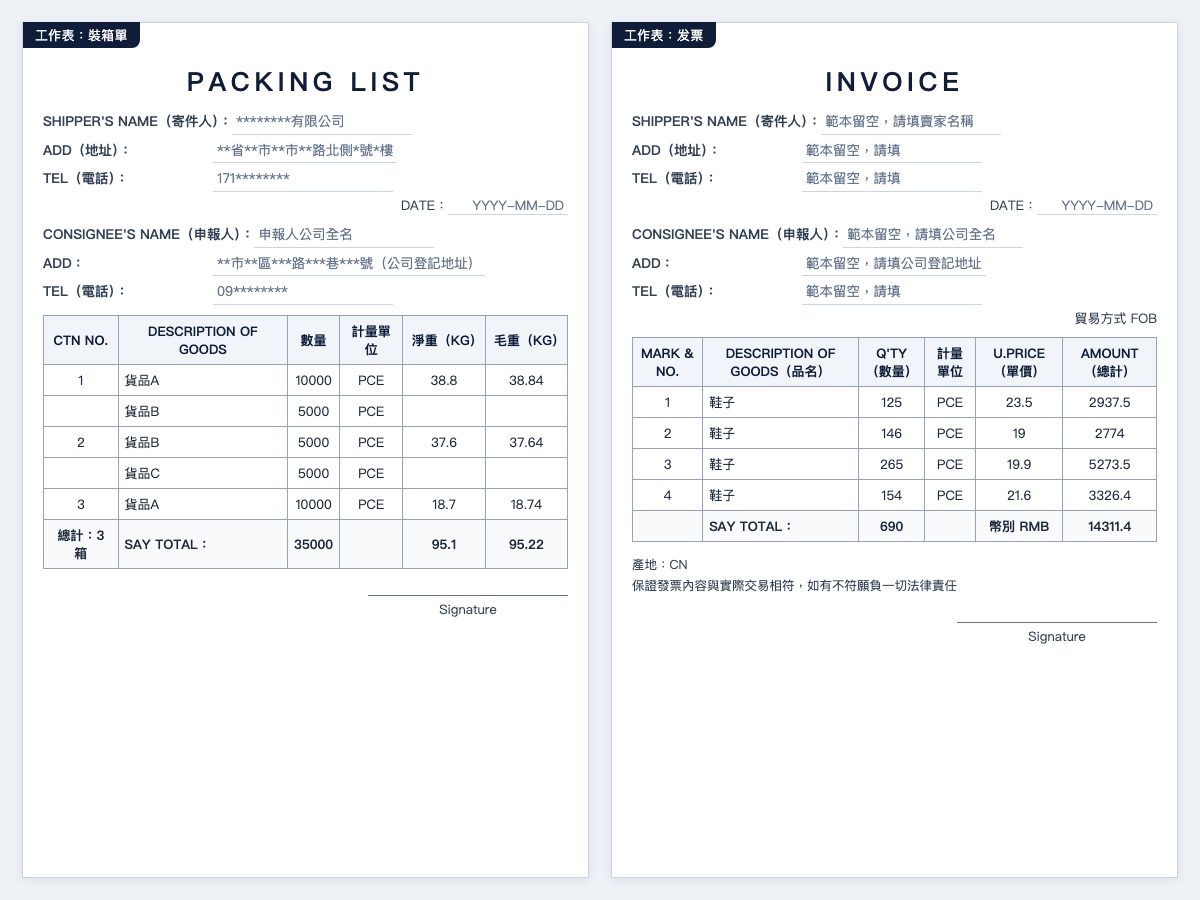
- Customs rules and practical requirements are two layers: the Customs Administration's "documents required for import declaration" lists the invoice and packing list as required documents, and the invoice must state in detail the consignee's name and address and the goods' description, brand, quantity, quality, specification, model, numbers, unit price, freight and insurance, among others; the uniform number is a field on the declaration (Taipei Customs notes on simplified declaration: X3 and X4 goods must declare the consignee's business uniform number), while net and gross weight, currency, country of origin and trade terms are practical fields that the customs broker and HowBridge's system use for checking.
- Common reasons for rejection: shipper and declarant missing on the invoice worksheet; product description too vague; net and gross weight left blank; currency not stated; quantity not matching what arrived at the warehouse.
- AI can do it too: after authorization, tell the AI assistant to make the packing list and invoice for this batch, and it generates an unstamped .xlsx from the data you provide and submits it to the system for checking (see AI assistant).
- Supplementary documents for C2 and C3: under Articles 13 and 14 of the Regulations Governing the Implementation of Customs Clearance Automation, when a declaration is routed to document review (C2) or cargo examination (C3), the declarant must submit the paper declaration and documents before the end of office hours on the day after receiving the notice (except where Customs has announced that electronic files may be transmitted); the customs broker will notify you, and the documents are the ones you uploaded.
1Shipper (SHIPPER)
The mainland China seller's or factory's name, address and telephone. Fill it in on both worksheets; the invoice worksheet in the template is blank by default, and uploading the template unchanged is rejected by the system.
2Declarant (CONSIGNEE)
Your company's full name, registered company address and Taiwan telephone number, matching the exporter/importer registration and the uniform number; this is the taxpayer on the import declaration.
3Product description, quantity, unit
One product per line; write the specific goods and material (for example "cotton knit T-shirt" rather than "apparel"), and the quantity and unit (PCE, SET, KG) must match what actually arrives at the warehouse.
4Net and gross weight
On the packing list enter the net and gross weight (kg) of each carton; the number of cartons and total weight must match what the Shenzhen warehouse actually measures, as large differences lead Customs to require corrections.
5Unit price, total, currency, trade terms
On the invoice enter the unit price and total for each line, stating the currency (RMB, USD) and the trade terms (for example FOB); the customs value is determined by Customs, but the invoice is the starting point of valuation.
6Country of origin, date, signature
Write CN (mainland China) as the country of origin; enter the issue date; the seller signs or stamps the company seal. The country of origin decides whether mainland China goods rules such as MW0 apply.
How do you download the tax documents and import declaration needed for your National Taxation Bureau (Taiwan) filing from "Tax documents"?
After clearance, the import declaration and the customs-collected business tax (VAT) payment certificate are imported into the "Tax documents" page in the HowBridge member center, where you can filter by company and month and download them; when filing Form 401, your accountant reports the input tax with the deduction copy of the payment certificate showing the company's uniform number, while customs duty cannot be deducted and goes into cost of goods. A formal declaration produces 4 documents per shipment (import declaration, tax payment certificate, customs broker's tax bill, declaration pre-review); a simplified declaration produces 2.
| Document | Where to get it | How your accountant uses it |
|---|---|---|
| Import declaration (general declaration) | Member center Tax documents, filtered by company and month | Purchase voucher; basis for calculating customs value, customs duty and business tax |
| Customs-collected business tax payment certificate (deduction copy) | Same as above; must show the company's uniform number (entered on the declaration by the customs broker) | Input tax deduction on Form 401 (Article 33 of the Business Tax Act, Article 38 paragraph 1 subparagraph 2 of the Enforcement Rules) |
| Customs broker's tax bill, declaration pre-review | Same as above (formal declaration only) | To check the declaration fee and advanced taxes; the pre-review is not the final document after clearance |
| HowBridge e-invoice (freight, declaration fee, handling fee) | Member center billing page | Input voucher; the taxes collected and paid on your behalf are not on the invoice |
- Input vouchers: Article 33 of the Value-added and Non-value-added Business Tax Act (Taiwan) and Article 38 of its Enforcement Rules: a business entity deducting input tax from output tax must hold a voucher showing its name, address and uniform number; for imported goods this is the deduction copy of the customs-collected business tax payment certificate.
- Filing deadline and form: Article 35 of the Business Tax Act: every two months is one period, and sales and the tax payable or overpaid are reported within 15 days after the start of the next period; business entities under the general tax computation that sell only taxable goods use the Business Entity Sales and Tax Return (Form 401). Article 19 lists input tax that may not be deducted (no voucher obtained, not for use in the business, entertainment, employee rewards, passenger cars for personal use).
- How to book customs duty: under Article 15 of the Business Tax Act, input tax means business tax only; Article 90 subparagraph 10 of the Guidelines for Examination of Profit-Seeking Enterprise Income Tax: customs duty on imported goods shall be included in the cost of the goods, and Article 45 requires keeping the foreign supplier's invoice and the customs tax payment documents; see the guide to business import VAT and formal declaration.
- Electronic access: Ministry of Finance press release (National Taxation Bureau of Kaohsiung, 2020-06-02): business entities that have been assigned e-invoice number tracks can download "import tax payment certificate data" from the Ministry of Finance e-filing and tax payment website with the MOEA business certificate (after the 6th of each month, covering payments up to the 23rd of the previous month within 6 months), and filing is based on the month of the payment date; on the Customs-Port-Trade Single Window you can pay taxes online with the business certificate and use TP102 to query historical taxes and fees and print receipts (Ministry of Finance press release of 2020-11-17).
- Documents not showing yet? HowBridge's accounting team imports the declaration and payment certificate after the customs broker provides them; if they are still not in "Tax documents" some time after clearance, tell the specialist on LINE.
How far can the AI assistant take you, and what must you do yourself?
With the authorization you grant at HowBridge, the AI assistant can look up tariff codes and import regulations, create parcel forecasts, generate the packing list and invoice from text, estimate costs and submit the formal-declaration consolidation order, and check document status; online payment, confirming or uploading the power of attorney, uploading the company seals and downloading tax documents must be done by you personally on the website. The declaration is filed by the partner customs broker; HowBridge does not file declarations with Customs on members' behalf either, because filing declarations for others is customs brokerage and requires a customs broker license.
| Task | AI assistant | You personally |
|---|---|---|
| Look up 11-digit tariff codes, duty rates, import regulations | Yes (permission mcp:use) | — |
| Create, edit, delete parcel forecasts; claim parcels | Yes (permission mcp:consolidation) | — |
| Generate the unstamped packing list + invoice and submit it for system checking | Yes (permission mcp:consolidation) | You keep the stamped version |
| Submit the formal-declaration consolidation order, cancel unpaid consolidation orders | Yes (permission mcp:consolidation) | — |
| Check formal-declaration document status, bills and payment status | Yes (read-only) | — |
| Confirm or upload the power of attorney, upload company seals | No | You, on the website |
| Online payment, download tax document PDFs, add a declarant | No | You, after logging in |
| File the declaration with Customs | No | Partner customs broker (authorized) |
- How to connect: add the HowBridge member edition connector in an MCP-capable AI assistant, log in to HowBridge and tick the permissions on the consent page (OAuth 2.1, no need to paste passwords or keys into the AI); steps and available commands in Connect an AI assistant to HowBridge and the developer documentation.
- Private lesson: for companies that sign up for this program, the specialist demonstrates the full process once with your actual products: tariff lookup, parcel forecast, generating the packing list and invoice, submitting the formal-declaration consolidation order.
- Revoking authorization: it only takes effect immediately when you click revoke under "Connected AI assistants" at /member/api in the member center.
- Legal boundary: Article 22 of the Customs Act (Taiwan): declaration formalities may be entrusted to a customs broker, and customs brokers must be licensed by Customs; Articles 2 and 7 of the Regulations Governing the Implementation of Customs Clearance Automation and the Internet Customs Declaration Operating Procedures allow importers and exporters to register on the Customs-Port-Trade Single Window with the MOEA business certificate and file their own declarations online, but filing declarations for others is customs brokerage, which is why both the AI and HowBridge only prepare and submit the data to the partner customs broker.
What does HowBridge do and not do here?
HowBridge receives your goods at the Shenzhen warehouse, consolidates them, ships them to Taiwan by commercial sea express, hands your documents to the partner customs broker, collects and pays the taxes on your behalf, places the declaration and tax documents in "Tax documents", and provides the specialist coaching on this page; HowBridge is not a customs broker, does not file declarations with Customs on your behalf, and does not apply for BSMI inspection exemptions on your behalf.
- We do: assess your products' import regulations (the conclusion is subject to Customs' determination), teach you to complete exporter/importer registration and long-term authorization, teach you to fill in the packing list, invoice and power of attorney, teach you to download tax documents for your books, and teach you to connect an AI assistant.
- We do not: hold your MOEA business certificate or passwords, stamp the company seal for you, fill in and submit applications for you, or apply for inspections or permits on your behalf; nor do we make any promise about the clearance outcome or tax amount.
- We do not discuss: under-declaring values, splitting shipments to avoid tax and the like. Formal declaration means declaring truthfully and obtaining legitimate vouchers.
- Support hours: AI support 24 hours; human support Monday to Friday 09:00–18:00 (Taiwan time), closed on public holidays. This page makes no promise about response times.
- Compensation and claims: under the current site rules, compensation for lost or damaged parcels is capped at three times the freight for that item (excluding precious metals and jewellery), and claims must be filed within 7 days of signing for delivery; see the FAQ.
What do the terms you meet in your first formal declaration mean?
- Commercial sea express
- HowBridge's sea express plan for companies and registered businesses that need a general import declaration; NT$55 per unit from 2026-11-11, billed on the greater of actual weight and volumetric weight, and declared by the partner customs broker on a general import declaration.
- Formal customs declaration (general import declaration)
- Importing on a general declaration filed with Customs, with your company as the importer; it produces an import declaration and a customs-collected business tax payment certificate that serve as input vouchers. The option on HowBridge's order screen is called "Formal declaration", and the customs declaration fee is NT$800.
- Simplified declaration
- Clearing express cargo on a simplified declaration form; high-value goods with a customs value over NT$50,000, goods subject to import regulations or commodity tax, and others must be cleared on a general declaration under the express cargo clearance regulations.
- Exporter/importer registration
- Registration of a company or registered business with the International Trade Administration, Ministry of Economic Affairs (Taiwan) (Article 9 of the Foreign Trade Act), after which it may run import and export business; apply online in the Exporter/Importer Registration System, English name pre-check first, then new registration.
- Case-by-case power of attorney
- The written document by which a taxpayer authorizes a customs broker to clear one specific shipment, in the Customs Administration's official format; one per shipment, stamped with the company seal and the responsible person's seal.
- Online long-term authorization (WJA02)
- Long-term authorization set up on the Customs-Port-Trade Single Window with a certificate, the MOEA business certificate in the case of a company; Ministry of Finance press release: free of charge, one authorization valid for up to 5 years; it takes effect after the other party accepts in WJA03, and no power of attorney is attached at declaration.
- Packing list and commercial invoice
- The packing list states what is in each carton, how many pieces, and the net and gross weight; the invoice states the product description, quantity, unit price, total, currency, trade terms and country of origin. Both are the basis for declaration and valuation.
- Customs-collected business tax payment certificate (deduction copy)
- Business tax on imported goods is collected by Customs; when the payment certificate shows the business entity's uniform number, its deduction copy is the voucher for reporting input tax.
- CCC 11-digit code and import regulation codes
- Taiwan's tariff codes have 11 digits; each code carries import regulation codes, for example MW0 (mainland China goods not permitted), MP1 (conditionally permitted), C02 (some goods subject to mandatory inspection), F01 (food import inspection).
- MOEA business certificate
- The electronic certificate card issued by the MOEA Certification Authority (Taiwan) to companies and registered businesses, used to log in and sign on government systems such as the Customs-Port-Trade Single Window; a company account can only use the card, not the mobile Citizen Digital Certificate.
- EZ WAY
- The app for real-name authentication and online authorization of express cargo for individual taxpayers (the real-name customs app for individual importers in Taiwan); declarations in a company's name do not use EZ WAY.
- AI assistant authorization (MCP)
- The HowBridge member edition MCP connector authorizes an AI assistant through OAuth 2.1 to access your own data and operations, with three permission levels, mcp:use, mcp:work-orders and mcp:consolidation, revocable at any time.
What are the sources and the scope of verification?
The sources below were consulted on 2026-11-09; laws follow the current text in Taiwan's Laws & Regulations Database, document dates and access dates are shown separately, and no date is invented where none is stated. HowBridge's services and fees follow the announcement of 2026-11-09 and the shipping rates page.
Official sources
- Foreign Trade Act (Taiwan) (Articles 3, 9, 10, 21) (2019-12-25; accessed 2026-11-09): Article 9 paragraph 1 provides that companies and businesses registered as exporters/importers with the Bureau of Foreign Trade, Ministry of Economic Affairs (now the International Trade Administration) may run import and export business = only companies and businesses can register; Article 9 paragraph 2 reserves an approved English name for six months; Article 9 paragraph 4 lists only closure, dissolution or revocation of registration as grounds for cancellation (there is no rule cancelling registration after a period without imports or exports); Article 10 paragraph 1 lets individuals import or export only specific goods not for the purpose of trade, and paragraph 2 lets only legal persons and groups apply the registration rules by analogy = individuals cannot register as exporters/importers; Article 21 provides for the trade promotion service fee as the only fee, with no registration fee provision
- Regulations Governing Registration of Exporters and Importers (Taiwan) (Articles 2, 3, 5, 8, 8-1, 10-1) (2025-04-08; accessed 2026-11-09): Article 2 provides that a company or business running import and export business may apply to the International Trade Administration, Ministry of Economic Affairs, under these Regulations to register as an exporter/importer = the registrant is a company or business; Article 3 requires applications by electronic data transmission = online only; Article 5 forbids an English name identical to an existing one or one deregistered less than two years ago; Article 8 has the Administration update the uniform number, Chinese name, responsible person and address automatically from company or business registration data; Article 8-1 lists only two grounds for revocation, voluntary application and a change of business scope that makes it unlawful, with no ground for lack of import/export records; Article 10-1 lets legal persons and groups (not individuals) register with their establishment certificate
- International Trade Administration, Ministry of Economic Affairs (Taiwan): registration section (introduction to exporter/importer registration) (accessed 2026-11-09): the official flow chart says to log in with the MOEA business certificate or an account and password, that new registrations and English name changes require an English name pre-check first, and that once approved the registration data is published online and transmitted to Customs; the only official figure for review time = processing time of 3 working hours for the English name pre-check, with everything else reviewed automatically by the system; the page has no wording about fees or free service
- International Trade Administration, Ministry of Economic Affairs (Taiwan): FAQ on import/export trade administration (registration, general import permits) (accessed 2026-11-09): what an exporter/importer is: companies and businesses may register, those prohibited or restricted by law may not; how to apply: first apply for an account in the Exporter/Importer Registration System, log in with the MOEA business certificate or an account and password, do the English name pre-check and then the new registration, with the result emailed; the organization-type options are business / branch / company / other (group or legal person) = no option for individuals; the business scope must include wholesale, retail, international trade or ZZ99999; an approved English name is reserved for 6 months; imports by unregistered parties: individuals or groups without exporter/importer status importing non-restricted goods for their own use must apply to the Administration for a general import permit when the FOB value exceeds US$20,000 or the equivalent
- International Trade Administration, Ministry of Economic Affairs (Taiwan): Exporter/Importer Registration System (home page notices) (accessed 2026-11-09): the official name of the online system = Exporter/Importer Registration System, at this URL; from 4 August 2021 (ROC year 110) the English name pre-check and registration are handled fully online = the whole process is online; the uniform number, Chinese name, responsible person and address are updated automatically by the Administration from business registration data; from 8 April 2025 (ROC year 114) the English name review rules were relaxed; help lines 02-27921900, 02-27922269, 0800313133
- Regulations Governing Import of Commodities (Taiwan) (Articles 7, 9) (2023-12-26; accessed 2026-11-09): Article 7: registered exporters/importers may import goods not on the List of Commodities Subject to Import Restriction without a permit (the term covers registered exporters/importers); Article 9: importers other than registered exporters/importers that do not import as a regular business must obtain a permit, but subparagraph 3 exempts goods not on the restriction list imported by sea, air or postal parcel with an FOB value of US$20,000 or less or the equivalent = an unregistered company can still import, but must first apply for an import permit when the FOB value exceeds US$20,000; paragraph 3 limits permits for unregistered importers to goods for their own use
- Customs Act (Taiwan) (Articles 17, 22, 84) (2022-05-11; accessed 2026-11-09): Article 22 paragraph 1: declaration, tax payment and other formalities for goods may be entrusted to a customs broker = the importer can do it alone or authorize someone (may); Article 22 paragraph 2: a customs broker must be licensed by Customs before completing company or business registration = declaring for others is customs brokerage that requires a Customs license; Article 17 paragraph 1: at import declaration, the import declaration must be filed together with the invoice, packing list and other required import documents = the required documents for formal declaration; Article 84: administrative fines of NT$6,000 to NT$30,000 for violating the customs broker regulations
- Regulations Governing Customs Clearance of Air Express Cargo (Taiwan) (Articles 11, 12, 17) (2026-02-23; accessed 2026-11-09): Article 17 paragraph 1 lists three authorization methods: first, written case-by-case or long-term authorization; second, online case-by-case or long-term authorization via the Customs-Port-Trade Single Window; third, online case-by-case authorization via a customs clearance network provider's real-name authentication platform; Article 17 paragraph 2: if authorization is not completed by one of these methods, Customs may refuse the declaration = authorization is a precondition for acceptance; Article 11 defines four categories (high-value = customs value over NT$50,000); Article 12: high-value goods, goods subject to import regulations or commodity tax, etc., must be cleared on a general declaration
- Regulations Governing Customs Clearance of Sea Express Cargo (Taiwan) (Articles 11, 12, 18) (2026-02-23; accessed 2026-11-09): the sea express counterparts: Article 11: imported high-value express cargo means a customs value over NT$50,000; Article 12 paragraph 1: high-value goods, goods subject to import/export regulations, commodity tax or the specifically selected goods and services tax, tariff quotas, etc., must be cleared on a general import or export declaration, and paragraph 2 allows other sea express cargo to be cleared on a simplified declaration form; Article 18 lists the same three authorization methods as Article 17 of the air express regulations
- Regulations Governing the Establishment and Management of Customs Brokers (Taiwan) (Articles 12, 13) (2026-02-23; accessed 2026-11-09): Article 12 paragraph 1: a customs broker declaring on behalf of an importer or exporter must hold a power of attorney; for a fixed importer/exporter's long-term authorization it may file the power of attorney in advance for Customs to record, and afterwards enter the Customs record number on the declaration instead of issuing a power of attorney each time = case-by-case authorization is one per shipment, long-term authorization is recorded once; paragraph 2: the power of attorney must follow the format prescribed by Customs; paragraph 4: online methods = online case-by-case or long-term authorization via the Single Window, or online case-by-case authorization via a real-name authentication platform; Article 13: brokers must declare according to the invoice and bill of lading provided by the importer/exporter
- Customs Administration, Ministry of Finance (Taiwan): forms download (operator management) (accessed 2026-11-09): where the official power of attorney forms are: Customs Administration website, Information › Downloads › Forms, listing the case-by-case power of attorney dated 2017-09-19 and the long-term customs power of attorney dated 2017-08-31
- Customs Administration, Ministry of Finance (Taiwan): case-by-case power of attorney (official .doc format, last revised 19 September 2017, ROC year 106) (2017-09-19; accessed 2026-11-09): the official case-by-case power of attorney: authorization under Article 22 paragraph 1 of the Customs Act, covering the goods on the declaration listed below, with a box for the import declaration number and the house bill of lading number (mandatory for simplified declaration) = one per shipment; the signature block reads principal (seal), responsible person's name (seal), uniform number, and specifies the principal's company seal and the responsible person's dedicated seal = company seal + responsible person's seal; attachment download /download/cus1_62995_1206 (.doc)
- Customs Administration, Ministry of Finance (Taiwan): long-term customs power of attorney (official .odt/.pdf format, last revised 31 August 2017, ROC year 106) (2017-08-31; accessed 2026-11-09): the official long-term power of attorney: from year/month/day to year/month/day = it has a validity period; the authorization category to tick is importer/exporter; the principal and the responsible person each sign and seal; if the principal later wishes to limit the agent's authority or terminate the authorization, it must first notify Customs in writing, taking effect only after Customs updates the authorization data = termination requires written notice to Customs; the header has approval date / approval case number = recorded by Customs
- Ministry of Finance (Taiwan) press release: use the Customs-Port-Trade Single Window for online customs authorization, convenient and secure (Keelung Customs) (2023-05-23; accessed 2026-11-09): the official wording on online long-term authorization: no extra software is needed, only the MOEA business certificate, or an employee authorized to use their Citizen Digital Certificate; it can be done online, is easy to operate and free of charge, and one authorization is valid for up to 5 years = free, up to 5 years, business certificate; it replaces the old paper process of writing out the form and stamping the company seals = paper requires the company seals; manual path: Downloads / Operating manuals / Customs-Port-Trade Single Window system operation / User manuals / Online authorization system
- Customs-Port-Trade Single Window system operation / user manual (III)-2-13, supplement 13: online authorization system (V300) (2017-06-16; accessed 2026-11-09): the official source of the WJA codes: WJA01 apply for case-by-case customs authorization, WJA02 apply for long-term customs authorization, WJA03 maintain customs authorization (accept/reject), WJA04 query, WJA05 operator query of authorized declarations; WJA02 can be initiated by either the importer/exporter or individual or the customs broker, the principal enters the customs broker's box number, customs district and authorization start and end dates and clicks send power of attorney, which emails both parties, and the other party accepts in WJA03 (status A awaiting the operator's acceptance, B awaiting the customs broker's acceptance)
- Customs-Port-Trade Single Window simple registration manual V1.4 (2023-06-16; accessed 2026-11-09): hardware and component requirements for a company registering its certificate on the Single Window: certificate registration (MOEA business certificate card, organization and group certificate card), step 2: insert the certificate card into the card reader and enter the certificate PIN = card reader + business certificate card needed; because certificate registration uses the WebSocket component, download it if not installed = the Single Window's WebSocket component must be installed; the manual does not mention HiCOS
- Customs-Port-Trade Single Window: Citizen Digital Certificate / MOEA business certificate registration page (accessed 2026-11-09): registration applicant types are individual / enterprise, and enterprise attributes include general enterprise or organization/group = an ordinary import/export company registers with the MOEA business certificate; insert the certificate into the card reader, enter the PIN, then click the load Citizen (or business) certificate button = a card reader is needed; the mobile Citizen Digital Certificate is also supported
- Customs Administration, Ministry of Finance (Taiwan): documents required for import declaration (2026-07-08; accessed 2026-11-09): the official page listing formal declaration documents: the invoice/commercial invoice and the packing list are required; the invoice must state in detail the consignee's name and address, the goods' description, brand, quantity, quality, specification, model, numbers, unit price, freight, insurance, other charges to be added and taxes reduced or exempted at the port of export, etc. (the official list does not include the uniform number, country of origin, trade terms or net and gross weight); the bill of lading / air waybill is not required for online declarations; 1 power of attorney, to be attached case by case when a customs broker is used, not required for long-term authorizations recorded by Customs nor for authorizations handled through the online customs authorization web system; no import permit needed where exempt; for C2/C3, paper documents must be submitted before the end of office hours on the day after the declaration is transmitted
- Regulations Governing the Implementation of Customs Clearance Automation (Taiwan) (Articles 2, 7, 11, 13, 14) (2022-10-12; accessed 2026-11-09): Article 2 subparagraph 6 includes import/export businesses and individuals among online operators = importers and exporters can file their own declarations online; Article 7 subparagraph 1: those filing by computer connection must first register on the Single Window with a certificate and start online declaration after approval; Article 11: declarations must follow the original, genuine invoice and bill of lading; Article 13: C1 no document review or inspection, C2 document review, C3 cargo examination; Article 14 paragraphs 2 and 3: for C2/C3, the paper declaration and related documents must be submitted before the end of office hours on the day after receiving Customs' online notice, except where Customs has announced that electronic files may be transmitted
- Guidelines for Examination of Profit-Seeking Enterprise Income Tax (Taiwan) (Articles 37, 45, 90) (2023-12-11; accessed 2026-11-09): Article 90 subparagraph 10: customs duty on imported goods shall be included in the cost of the goods = customs duty is not deductible input tax but cost of goods purchased; Article 37: purchase cost includes all necessary expenses paid to acquire the goods and make them fit for business use; Article 45 subparagraph 1: original vouchers for goods purchased abroad = the foreign supplier's invoice, customs tax payment documents and receipts for customs clearance and delivery charges = the company keeps the foreign invoice and customs tax documents for income tax
- Taipei Customs, Customs Administration (Taiwan): notes on simplified declaration of imported express cargo (2024-07-09; accessed 2026-11-09): the X1 to X4 categories, with the last (X4) required to use a general formal declaration; item (2): on a formal declaration, one consignee per declaration; item (12): low-value dutiable express cargo (X3) and high-value express cargo (X4) must declare the consignee's name, address and business uniform number, and where no business uniform number is declared, business tax is payable as prescribed = the company must have the customs broker enter the uniform number on the declaration so that the payment certificate shows it for deduction
- Value-added and Non-value-added Business Tax Act (Taiwan) (Articles 15, 19, 33, 35) (2025-05-28; accessed 2026-11-09): Article 15 paragraph 3: input tax means the business tax paid by a business entity when purchasing goods or services as prescribed = only business tax is deductible, customs duty is not input tax; Article 33: deduction vouchers must show the entity's name, address and uniform number, and subparagraph 3 covers other vouchers approved by the Ministry of Finance that show the business tax amount, which includes the customs-collected business tax payment certificate; Article 19 paragraph 1: subparagraph 1 input tax without the vouchers of Article 33 obtained and kept, subparagraph 2 not for use in the business, subparagraph 3 entertainment, subparagraph 4 employee rewards and subparagraph 5 passenger cars for personal use may not be deducted; Article 35: every two months is one period, and within fifteen days after the start of the next period a return in the prescribed form must be filed reporting sales and the business tax payable or overpaid
- Enforcement Rules of the Value-added and Non-value-added Business Tax Act (Taiwan) (Article 38) (2024-12-17; accessed 2026-11-09): Article 38 paragraph 1 subparagraph 2: the deduction copy of the customs-collected business tax payment certificate showing the business tax amount = the name of the input voucher for imported goods; subparagraph 12 of the same paragraph: the e-invoice certification copy; paragraph 2: with approval, data transmitted over the internet may replace the voucher
- Regulations Governing the Use of Uniform Invoices (Taiwan) (Article 7) (2024-12-12; accessed 2026-11-09): Article 7 subparagraph 1: the second copy of a triplicate uniform invoice is the deduction copy, given to the buyer for reporting tax deductions or credits under the Act = the deduction copy of a uniform invoice is used for domestic purchases; imports have no uniform invoice, and the deduction voucher is the deduction copy of the customs-collected business tax payment certificate
- Ministry of Finance (Taiwan) press release (National Taxation Bureau of Kaohsiung): business entities using e-invoices can download import tax payment certificates with the MOEA business certificate, making business tax filing easier (2020-06-02; accessed 2026-11-09): the primary source for electronic download: the Ministry of Finance e-filing and tax payment website lets business entities assigned e-invoice number tracks download customs-collected import tax payment certificate data with the MOEA business certificate, path tax.nat.gov.tw home / business tax / filing enquiries / downloads for domestic business entities / import tax payment certificate download; after the 6th of each month, covering payments up to the 23rd of the previous month within 6 months; filing must use the month of the payment date and exclude the non-deductible items of Article 19; note that this is the Ministry of Finance e-filing website, not the Customs-Port-Trade Single Window
- Ministry of Finance (Taiwan) eTax portal: Business Entity Sales and Tax Return and notes (Forms 401, 403 and 404), A4 format (downloaded 2026-11-09): 401 is the official form number of the Business Entity Sales and Tax Return (401) (general tax computation, for business entities selling only taxable goods), the prescribed return under Article 35 of the Business Tax Act; the deductible input tax section of the form distinguishes uniform invoice deduction copies, purchases and expenses, fixed assets and other columns
- Ministry of Finance (Taiwan) press release: to speed up clearance, Customs offers multiple tax payment channels (Keelung Customs) (2020-11-17; accessed 2026-11-09): the function codes for querying tax and fee data on the Customs-Port-Trade Single Window are the TP series, not GC: TP102 (historical tax and fee enquiry, print payment receipts) can query tax and fee data for general import declarations; payment channels include logging in to the Single Window with the Citizen Digital Certificate or the MOEA business certificate and paying by web ATM or bank account transfer
- Customs Administration, Ministry of Finance (Taiwan) press release: Customs urges importers to pay taxes and fees online through the Customs-Port-Trade Single Window (2023-09-27; accessed 2026-11-09): after paying online, the tax payment receipt can be queried online within 1 year of payment and downloaded for the payer's own use; registration: users may register on the Single Window with a certificate, then log in with the certificate to query unpaid tax bills; transfer limits apply to each account type
- Ministry of Finance (Taiwan) press release: electronic commodity tax payment certificates for imported goods are now available on the Customs Administration's Customs-Port-Trade Single Window (2020-02-04; accessed 2026-11-09): for imported goods subject to commodity tax (electrical appliances, etc.), the commodity tax payment certificate can be obtained as an electronic file by logging in to the Single Window with the MOEA business certificate or a Citizen Digital Certificate authorized by it = the electronic certificate a company can get on the Single Window with its business certificate is the commodity tax payment certificate, not the business tax payment certificate (the business tax voucher is obtained separately from the Ministry of Finance e-filing and tax payment website)
- Customs Administration, Ministry of Finance (Taiwan): express consignee real-name authentication FAQ (2020-07-08; accessed 2026-11-09): Q11: companies and registered businesses cannot use real-name authentication and should use the paper authorization method at import declaration, giving the case-by-case power of attorney to the customs broker they appoint = companies cannot authorize online via EZ WAY; the header lists the eligible users as ROC nationals and foreign nationals holding a residence permit; Q1: company-registered numbers, prepaid cards and special telecom plans cannot be authenticated; Q7 shipment status enquiry code (GC329), Q2 import regulation enquiry (GC473)
- Customs Administration, Ministry of Finance (Taiwan): express consignee real-name authentication, notes for the public (2020-03-18; accessed 2026-11-09): real-name authentication applies to simplified declarations of imported express cargo (not subject to import regulations, customs value not over NT$50,000) and to ROC nationals and foreign nationals holding a residence permit = natural persons only; the random check of customs authorizations keeps a dual-track system, so the public may still issue a paper power of attorney under the current paper process = paper is still valid
- Customs Administration, Ministry of Finance (Taiwan): express consignee real-name authentication, introduction and instructions (2021-04-09; accessed 2026-11-09): the EZ WAY mechanism is a real-name authentication procedure that binds a mobile number to a personal national ID or residence permit number = it binds a personal ID number, and legal persons have none; from 16 May 2020 (ROC year 109) the clearance system checks the customs authorization of express cargo, and if the customs broker does not undertake to have obtained the importer's authorization document and the declared importer has not completed real-name authentication, the declaration is not accepted
- Customs Administration, Ministry of Finance (Taiwan): express consignee real-name authentication, legal basis (2020-03-18; accessed 2026-11-09): the legal basis the Customs Administration itself lists for real-name authentication = Article 27 of the Customs Act, Article 17 of the Regulations Governing Customs Clearance of Air Express Cargo, Article 18 of the Regulations Governing Customs Clearance of Sea Express Cargo and Article 12 of the Regulations Governing the Establishment and Management of Customs Brokers
- Internet Customs Declaration Operating Procedures (Customs Administration, Ministry of Finance, Taiwan) (2018-11-23; accessed 2026-11-09): point two: declarants use the internet declaration system provided by a customs clearance network provider or the Customs-Port-Trade Single Window to declare online; point three (two): users of the Single Window's internet declaration system register with the Single Window using any of the MOEA business certificate, Citizen Digital Certificate, government certificate or organization and group certificate = a company can register with its business certificate and declare online itself; point four: the acceptance message completes the declaration; read with Article 22 of the Customs Act, self-declaration = the importer declaring for itself, while declaring for others requires a customs broker license
This page does not cover: processing times for exporter/importer registration (as shown in the International Trade Administration's system); the application details for inspection, testing or permits for each product category (per the competent authority's rules); individual customs brokers' requirements on the format and transmission of powers of attorney (the specialist tells you on LINE); the details of recognizing cost of goods for profit-seeking enterprise income tax (consult an accountant); and real-world testing of AI assistant authorization on the ChatGPT side (currently tested only with Claude).
What are the common questions about free coaching for your first formal declaration?
Can individuals or people without a uniform number apply?
Must I complete exporter/importer registration before a formal declaration?
Can I set up online long-term authorization without an MOEA business certificate?
Is the free coaching only for the first shipment? What about the second one onwards?
What do I pay for the first shipment? Is the coaching really free?
When and how are taxes paid?
Can I deduct business tax with a simplified declaration under the company's uniform number?
Can AI file the customs declaration for me?
Will the specialist submit applications to the International Trade Administration or Customs for me?
Can I do this without LINE?
When do the declaration and tax documents appear in "Tax documents" after clearance?
Is HowBridge a customs broker? Who is responsible for the declaration?
Further reading
Business imports: business tax, import taxes and formal declaration guide
Complete guide to commercial sea express
Exporter/importer registration guide
Customs-Port-Trade online long-term authorization WJA02 application guide
How to read an import declaration: business tax input deduction guide
Simplified declaration (X form) and the ten exclusions
Import permit overview and import regulation codes
Connect an AI assistant to HowBridge: check parcels, create forecasts, submit consolidation orders
Developer documentation and MCP tools
E-invoice guide
Tariff lookup (11-digit codes and import regulations)
Shipping and import tax estimator
Sign up on LINE for free coaching on your first formal declaration
Tapping opens HowBridge's official LINE @0523tw with the sign-up message pre-filled; add your company name and main products and a specialist takes over one-on-one. You can sign up before buying the goods.
Sign up one-on-one on LINE