What can the HowBridge Facebook Page do? How do the Messenger menu, commands and notifications work?
Quick answer: what can Messenger on the HowBridge Facebook Page do?
The HowBridge Facebook Page is named 好運器 (HowBridge), at facebook.com/luckyconveyances, and is run by HowBridge Information Co., Ltd. (Meta Business Verification completed). Messenger currently offers four kinds of features: ① the Consolidation Assistant: the persistent menu below the chat. Before you link your member account it has 6 buttons (🔗 綁定會員 (🔗 Link membership) / 🧮 運費試算 (🧮 Shipping estimate) / 📖 怎麼使用 (📖 How to use) / 📲 下載 App (📲 Download the App) / 💬 問客服 (💬 Ask support) / 🌐 語言 (🌐 Language)); after linking it switches to the 6-button member menu (📦 選包裹集運 (📦 Consolidate packages) / 🚚 查貨況 (🚚 Track shipments) / 🧮 運費試算 (🧮 Shipping estimate) / 📋 預報單號 (📋 Add forecast) / 🏠 收件人・申報人 (🏠 Recipients · Declarants) / ☰ 更多功能 (☰ More features)), and your first conversation also shows 4 ice breakers. You can also type text commands such as 集運 (consolidate), 貨況 (tracking), 費用 (costs) or 預報 (forecast); the rules are exactly the same as on the website consolidation page and the LINE Consolidation Assistant (all three share one workflow); ② shipping and tax estimates: no member link needed, just type 試算 (estimate) and send one line of dimensions and weight; ③ human support: any message that is not a command goes to the support inbox and is answered in order, Monday to Friday 09:00–18:00; ④ EZ WAY declaration-match reminders: support can send the customs broker's declaration number to your Messenger within 24 hours of your last message. Note Messenger's 24-hour reply window: more than 24 hours after your last message, HowBridge can no longer message you first, so automatic notifications such as warehouse check-in, customs release and status updates still go via App → LINE → Email and are not sent to Messenger. Consolidation, tracking, forecasting and recipient management all require linking Messenger to your member account first.
HowBridge has only a Shenzhen consolidation warehouse and a Taoyuan operations warehouse, and only provides consolidation shipping from China → Taiwan; we have no warehouses in other countries and do not offer purchasing-agent services. Every feature of the Facebook Page and Messenger is built around this single route: anything you can consolidate in Messenger is a parcel that has already been delivered to and checked in at the Shenzhen consolidation warehouse.
How do I find the HowBridge Facebook Page, start a conversation and link my member account?
The Page is named 好運器, at facebook.com/luckyconveyances; the Facebook icon in this site's footer also links there. Tap "Send Message" on the Page, or open m.me/luckyconveyances directly, and you are in the Messenger chat. In your first conversation you will see a "Get Started" button and 4 ice breakers; tap "Get Started" or send any message and the system replies with a welcome message. If you have not linked yet, your personal one-time linking link is included in that welcome message; if you are already linked, the feature menu follows. You can get a new link at any time by tapping 🔗 綁定會員 (Link membership) on the persistent menu or sending "綁定" (bind), but each time a new link is sent, the previous one stops working, so always tap the link in the latest message in the chat. "Linking your member account" is the prerequisite for the consolidation features: HowBridge only recognises people whose Messenger account is linked one-to-one with a member account, so that nobody else can get at your parcel data. Linking has just two rules:
| Rule | Who it is for | What you do | Note |
|---|---|---|---|
| Rule 1: automatic linking | Members who use Facebook Login / sign-up on this site | Nothing at all. The first time you message the Page, the system asks Meta whether your Facebook account corresponds to a member of this site; if it matches exactly one member, the link is made automatically. | The same Facebook account must be both the one you log in to this site with and the one you message from; if your member account is already linked to another Messenger, it will not be overwritten automatically. |
| Rule 2: personal link | Members who signed up with LINE, Google, Apple or Email, or people who do not have an account yet | In your first conversation, the welcome message already includes a one-time link that belongs only to you (the URL starts with 0523.tw/bind/…); you can also get a new one in the chat later by tapping 🔗 綁定會員 (Link membership) on the persistent menu. Open it, log in the way you usually do (Facebook, LINE, Google, Apple or Email all work) or create a new account; the link is made as soon as you are logged in. | The link can be used only once and only by you; it expires after use. Tapping 🔗 綁定會員 (Link membership) or sending "綁定" (bind) again issues a new link and voids the old one, so always use the latest. Members linked this way will be asked, the first time they use a consolidation feature, to "log in to 0523.tw once with the same Facebook account" for verification (see below). |
The completion page shows "Linking complete" with a "Back to Messenger" button. Afterwards, if you type 綁定 (bind) in the chat, the system replies "Your Messenger is linked to your 0523.tw member account". If you came from the notification channel settings page in the Member Center, go back to that page after linking and tap "Done, check again". One member account can be linked to only one Messenger, and one Messenger to only one member account; to switch, send a message to support.
A link can be forwarded. To confirm that the person operating the chat is really you, members linked under "Rule 2" get a "Verification needed once more" card the first time they tap consolidation, tracking or any other feature that needs member data; you are asked to log in to 0523.tw with the same Facebook account (or connect Facebook under Member Center → Account security). Once the system matches your Facebook account, you are through. Members who log in to this site with Facebook (Rule 1) do not need this step.
"Fake online shopping" is the scam type with the most cases reported each month on the 165 Anti-Fraud Dashboard (3,639 cases in August 2026); typical signs are one-page ads, insisting on private deals over LINE or other messaging apps only, and "limited time" or "countdown" pressure to pay. To identify the real HowBridge, check three things: ① the Page URL is facebook.com/luckyconveyances, and the Facebook icon in this site's footer links to that same Page; ② tap the Page name below the cover photo → "Transparency and privacy policy" (in some versions, "Page transparency" on the "About" tab) to see the creation date, the primary country/region of the people who manage the Page, and previous names; be extra careful with Pages that were just created or have changed their name; ③ HowBridge never adds you from a personal Facebook account or a second Page, never asks for full credit card details or online banking passwords in Messenger, shipping and tax are always paid only on this site's billing page, and official messages never push you to act within minutes. If a message looks suspicious, read the Complete Guide to Avoiding Cross-Border Shopping Scams first, or call 165.
Which buttons are on the Messenger persistent menu? What are the ice breakers?
Once you are in the Messenger chat with HowBridge, the menu icon next to the input box opens the persistent menu (Meta calls it the Persistent Menu). HowBridge shows two different menus depending on whether you have linked your member account: before linking you see the 6-button "not-yet-linked menu"; once linking is complete, the system sets a 6-button "member menu" for you individually, the same as the consolidation menu that linked members see on the LINE official account. In addition, before you have sent any message, the chat shows 4 ice breakers (Ice Breakers); tapping one is the same as sending that command. The button labels are currently shown in Chinese only:
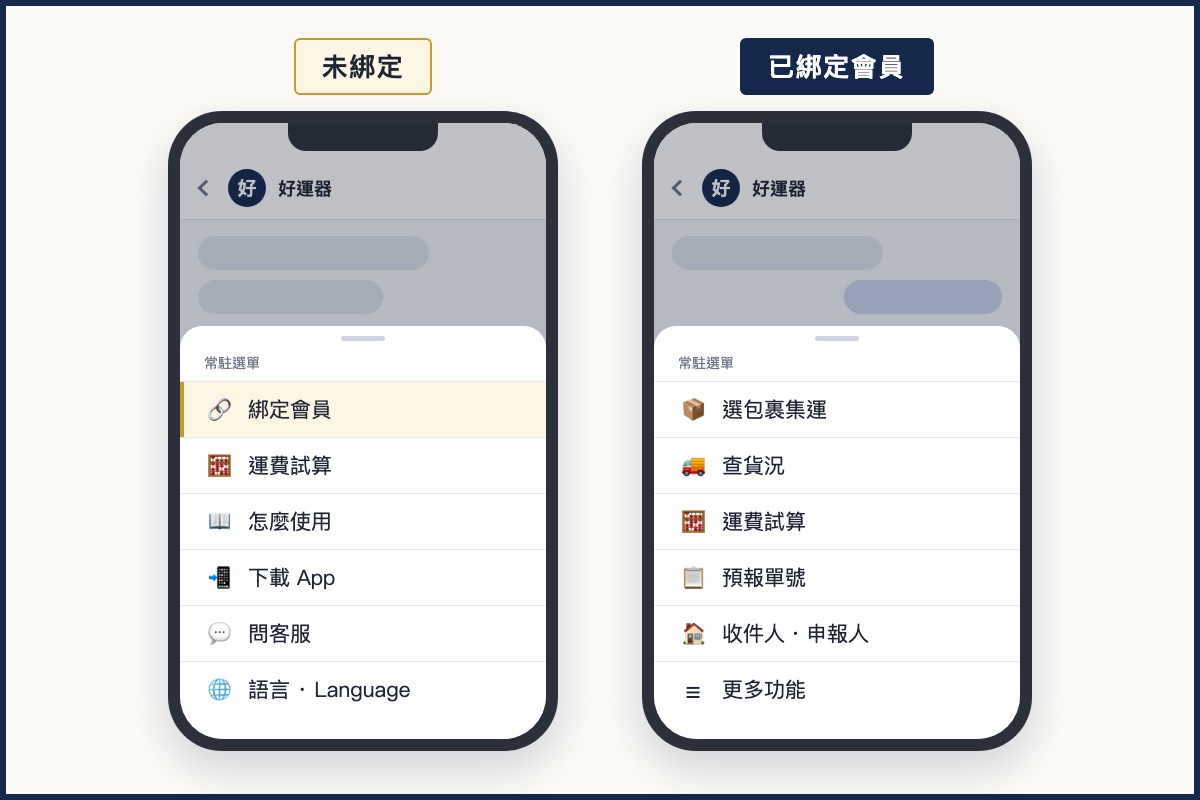
| Position | Button | What happens when you tap it | Member link required? |
|---|---|---|---|
| Not-yet-linked menu 1 | 🔗 綁定會員 – Link membership | Sends your personal one-time linking link in the chat (Rule 2). You can get at most 3 new links per 10 minutes; if you tap too often, the assistant asks you to scroll up to the latest one. If you are already linked, it tells you that you can use the menu right away. (This automatic reply is in Chinese.) | Not required |
| Not-yet-linked menu 2 | 🧮 運費試算 – Shipping estimate | Goes straight to the shipping and tax estimate; just send one line of "length width height weight" (see "Shipping and tax estimate" below). | Not required |
| Not-yet-linked menu 3 | 📖 怎麼使用 – How to use | Opens this page. | Not required |
| Not-yet-linked menu 4 | 📲 下載 App – Download the App | Opens the HowBridge App download page. | Not required |
| Not-yet-linked menu 5 | 💬 問客服 – Ask support | The assistant replies "Please type your question here (you can add a tracking number or photos)"; then just type, and a human agent replies during service hours. (This automatic reply is in Chinese.) | Not required |
| Not-yet-linked menu 6 | 🌐 語言 · Language | Choose the language the assistant replies in. | Not required |
| Member menu 1 | 📦 選包裹集運 – Consolidate packages | Lists your parcels that are "in warehouse" at the Shenzhen consolidation warehouse, all selected by default; then you enter the total goods value, confirm the details and submit the consolidation order (see the three steps below). | Appears only after linking |
| Member menu 2 | 🚚 查貨況 – Track shipments | Replies with an overview: how many parcels are waiting to be consolidated, how many batches are being packed at the warehouse, how many are in transit and how many forecasts are pending; then lists each batch in transit (status, customs stage, numbers, estimated clearance and delivery dates). | Appears only after linking |
| Member menu 3 | 🧮 運費試算 – Shipping estimate | Goes straight to the shipping and tax estimate. For the costs of completed consolidation orders, type the text command 查費用 (check costs) or see the bills page. | Appears only after linking |
| Member menu 4 | 📋 預報單號 – Add forecast | The assistant first sends an explanation with a "Paste numbers" button; tapping it shows the prompt "Please paste the courier tracking numbers you want to forecast, one per line; you can send several at once". Paste the numbers and send them back to complete the forecast. | Appears only after linking |
| Member menu 5 | 🏠 收件人・申報人 – Recipients · Declarants | Replies with how many recipients and declarants you currently have; then tap "Recipients" or "Declarants" to add, set as default or delete (see the recipients and declarants section below). | Appears only after linking |
| Member menu 6 | ☰ 更多功能 – More features | Opens 更多功能 (More features): 查稅則 (Tariff lookup, opens the tariff search page), 帳單支付 (Bills & payment, opens the bills page), 稅單管理 (Tax documents, opens the “Customs” tab of the bills page, straight to your freight e-invoices), 已付歷史 (Paid history, opens the “History” tab of the bills page), 供應鏈管理 (Supply-chain management, opens the “Products” tab of the website consolidation page, i.e. your member product list) and 切換語言 (Switch language), plus a 到網站集運頁 (Go to website consolidation page) button. | Appears only after linking |
| Ice breaker 1 | 運費試算 – Shipping estimate | Same as the "Shipping estimate" menu button. | Not required |
| Ice breaker 2 | 查貨況 – Track shipments | Same as "Track shipments" on the member menu. | If not linked, you first receive a linking link |
| Ice breaker 3 | 預報單號 – Add forecast | Same as "Add forecast" on the member menu. | If not linked, you first receive a linking link |
| Ice breaker 4 | 更多功能 – More features | Same as "More features" on the member menu. | If not linked, you first receive a linking link |
The consolidation features all need your member data, so people who have not linked yet first see a menu built around "Link membership" and features that need no linking; once linking is complete, the system sets the member menu for you individually. Meta states that Page-level persistent-menu changes can take up to 24 hours to reach all users, so if the menu you see differs from this page it has most likely not taken effect yet; meanwhile you can type the text commands in the next section. Meta also requires Messenger v106 or later on iOS / Android for the persistent menu to be shown.
All 6 buttons on the not-yet-linked menu work without linking. If, in your first conversation, you tap the ice breakers 查貨況 (Track shipments), 預報單號 (Add forecast) or 更多功能 (More features), your personal linking link (Rule 2) is in the welcome message sent at the same time, so tap that one; if you later tap a feature that needs linking or type a consolidation text command, the assistant replies with a new personal linking link (the old one then stops working). Once you have linked, they work. Shipping and tax estimates do not require linking.
Can I use it without the menu? What text commands are there?
Yes. The Consolidation Assistant only responds to text messages that exactly equal a keyword or match a fixed prefix format; any other text is treated as a message for support and goes to the support inbox as usual, without being intercepted by the bot. In other words, typing 集運 (consolidate) summons the assistant, while typing "I have a question about consolidation" reaches support. Messenger's command set is the same as the LINE Consolidation Assistant's, plus three Messenger-only commands:
| What you want to do | What to type | Notes |
|---|---|---|
| Link member account (Messenger only) | Link account (綁定) Link member account (綁定會員) bind | Not linked: re-issues your personal linking link (the old one is voided); linked: replies that linking is complete. This is the word the notification channel settings page asks you to send. |
| Open "More features" | 選單 功能 功能選單 集運助理 menu help (Messenger also accepts 服務, ? and ?) | Linked: replies with "More features" (tariff lookup, bills & payment, tax documents, paid history, supply-chain management, switch language). Not linked: replies with your personal linking link. |
| Consolidate packages | Parcel consolidation (集運) Select parcels for consolidation (選包裹集運) I want parcel consolidation (我要集運) Request parcel consolidation (申請集運) | Same as the persistent-menu item "Consolidate packages". |
| Track shipments | Shipment status (貨況) Check shipment status (查貨況) My parcel consolidation (我的集運) Delivery progress (運送進度) | Replies with the overview and the list of batches in transit. |
| Paste a package number directly (Messenger only) | A HowBridge package number starting with LK followed by 10–14 digits (the message contains only the number) | Replies directly with that package's status; only packages under your account can be looked up. For other numbers use the format in the next row. |
| Track a specific number | Track shipment: <tracking number> (查貨況:<單號>) | The number must be at least 5 letters/digits; only packages, consolidation orders and forecasts under your account can be looked up. Within 10 minutes of tapping "Track shipments", you can also just send the number on its own. |
| Check costs | Charges (費用) Check charges (查費用) Shipping costs and taxes (運費稅金) | Offers a choice when you have completed consolidation orders; to look up a specific number use 查費用:<單號> (at least 4 characters). |
| Estimate shipping | Estimate (試算) Estimate shipping costs (試算運費) Shipping cost estimate (運費試算) Calculate shipping costs (算運費) | No member link needed; then send one line "length width height weight". Type 取消 (cancel) at any point to stop. |
| Forecast tracking numbers | Pre-alert (預報) Pre-alert tracking number (預報單號) | Then tap "Paste numbers" and paste the numbers (separate several with line breaks, spaces or commas, up to 20 at a time), or use 預報單號:<單號> directly. |
| Manage recipients | Recipient (收件人) Delivery address (收件地址) | To add one, start your message with 新增收件人(宅配) (home delivery), 新增收件人(7-11) or 新增收件人(全家) (FamilyMart); the assistant sends you a form template to copy and fill in. |
| Manage declarants | 申報人 | To add one, start with 新增申報人(個人) (individual) or 新增申報人(公司) (company). |
| Add details during a consolidation | Total goods value: <number> (總貨值:<數字>) Notes: <text> (備註:<文字>) | Only valid while a consolidation is in progress; when the assistant is waiting for the total goods value you can also just type the number; notes are limited to 10 characters. |
If support has replied to you within the last 15 minutes and you send just a keyword (for example answering support with the single word "貨況"), the system treats it as a reply to support and does not start the assistant. Stickers, images, files and location messages never trigger any feature and are left for support; Messenger does not offer "send a screenshot of the tracking number and get the status automatically".
Every round of cards carries a flow code; tapping a button on an old card returns "This button has expired. Please start again from the menu.", so use the newest card. Each user may perform at most 60 actions per minute, and rapid taps are queued; a step waiting for your text input stays valid for 10 minutes, and the whole flow is kept for 30 minutes.
On LINE, buttons can open the keyboard prefilled with a prefix such as "總貨值:"; Messenger has no such mechanism, so the assistant instead replies "Please enter the total value of the goods in this batch (in NT dollars), e.g. 1500", and you just type the content and send it, without adding any prefix yourself. Anything you need to copy (such as an HCT Logistics tracking number) is sent as a separate message so you can long-press to copy it; the recipient and declarant forms are sent to you as a whole block to copy, fill in every field and send back in full.
How do I ship parcels by consolidation in Messenger? Three steps
After you tap "Consolidate packages" or type 集運 (consolidate), the assistant first checks that you have no "delivered but unpaid" bills (if you do, it asks you to pay first), then lists the parcels checked in at the Shenzhen consolidation warehouse. The whole flow uses the same rules and the same order-submission code as the website consolidation page and the LINE Consolidation Assistant: whatever the website blocks, Messenger blocks too.
1Confirm the parcels to ship (all selected by default)
The assistant replies with a summary: number of parcels, total weight and the first 3 numbers (the rest shown as "… and N more"), with a "Consolidate all (N)" button below that goes straight to the next step; to pick parcels, tap "Select packages individually": each parcel becomes a card (number, check-in time, item name, HS code, weight, size), adjust with "Add this / Remove this" on the cards, then tap "Done selecting". Messenger shows at most 10 cards per message, so larger sets are split into several messages; at most 59 parcels are listed at once, so for more please use the website.
2Enter the total goods value
After you tap the consolidate button, the assistant replies "Please enter the total value of the goods in this batch (in NT dollars), e.g. 1500"; just type the number and send it (up to 8 digits, up to 2 decimal places). This is usually the only field you type by hand: the declaration type defaults to simplified declaration, the recipient to your default recipient, the shipping method to sea express, the declarant to the first available declarant, and the duty collection method (home delivery) to "Collected by HCT Logistics"; all of these can be changed afterwards.
3Check the confirmation card and submit
The confirmation card has four groups: ① Declarant · Recipient ② Total goods value · Declaration type ③ Duty collection method ④ Shipping · Packaging · Note. Messenger allows at most 3 buttons per message, so the confirmation card's buttons are split across several messages (the second and later ones are labelled "More actions"); tapping "Edit details" brings up a row of quick replies (Change recipient / Change declarant / Change value / Change declaration / Change tax method / Change shipping / Change packaging / Change note / Adjust packages). When everything is correct, tap the submit button (if you chose Tax+, the button states the amount); the assistant replies "Warehouse notified to pick and pack" with the consolidation number. Once submitted, the parcels enter the consolidation process and this cannot be undone by yourself.
- Total goods value over NT$50,000: this exceeds the limit for express simplified declaration. Since 15 September 2026 switching to formal declaration is no longer mandatory, but if you keep simplified declaration you must choose one of two options before submitting: "Reselect parcels and ship the rest another day" or "I accept the risk and submit with simplified declaration".
- Total goods value below NT$800: duty collection can only be "Tax+" or "Collected by HCT Logistics"; if you choose HCT collection, the submit button changes to "Accept duty-free rules and confirm".
- The declarant is a company (8-digit Tax ID): "Tax+" cannot be selected and convenience store pickup is not available; tax is charged separately as assessed by customs.
- Convenience store pickup (7-11 / FamilyMart): total weight including a 100 g packaging bag must not exceed 5,000 g, sea express only, the only tax option is "Tax+", and formal declaration cannot use store pickup.
- The Tax+ amount: the higher of "kilograms × NT$20" and "total goods value × 5%"; the submit button states the amount directly.
- Formal declaration: customs brokerage fee NT$800, HCT Logistics home delivery only, and the tax is collected and paid by HowBridge and added to your bill.
You can choose several packaging services: carton / wooden frame / waterproof bag / bubble bags / corner protectors / stickers (actual fees follow the warehouse quote; if it exceeds the basic quote you are notified separately, via App / LINE / Email, see the notifications section below). For the note, choose from "Fragile / Valuable / Flammable / Contains batteries" or write your own of up to 10 characters; it is printed on the picking list for the warehouse.
The confirmation card carries a version number: whenever you change anything (including removing a parcel or changing the total goods value), the version number is updated, the submit button on the old card no longer works, and the assistant asks you to check the new card and confirm again. This prevents submitting on the basis of an old card after the details have changed.
How do I track shipments and check costs in Messenger?
"Track shipments" and "Check costs" both read the data under your account, from the same source as the website's consolidation and billing pages; the assistant simply formats it as text and cards and sends it to the chat.
Track shipments: overview + list of batches in transit
The overview lists how many parcels are waiting to be consolidated, how many batches are being packed at the warehouse, how many are in transit and how many forecasts are pending, with "Consolidate packages" (shown only when parcels are waiting), "Search by number" and "Check costs" buttons. The consolidation orders in transit then appear as carousel cards (up to 10 per message): status, customs stage, master number, weight, estimated clearance and delivery dates, the HCT Logistics numbers of the first 3 sub-orders and the latest logistics event; tap "View detailed progress" to see the last 8 events of each sub-order (newest first), and tap "Copy HCT number" to have the number sent as a separate message for easy long-press copying. Batches being packed at the warehouse come in a separate message, listing up to 6 batches.
Look up by number: one number, every stage
Tap "Search by number" and send the number, or type 查貨況:<單號> (at least 5 characters). The assistant matches in order: master numbers, sub-order numbers, HCT Logistics numbers or courier tracking numbers of shipments in transit → batches being packed → your parcels (courier tracking numbers; replies with claimed / in warehouse / value-added service in progress / being consolidated / dispatched / returned) → forecasts (shows in how many days it will be deleted automatically) → consolidation orders. If nothing matches it replies "not found" and reminds you that only data under your account can be searched. If the whole message is a single HowBridge package number starting with LK, it replies directly without any prefix.
Check costs: completed consolidation orders only
When you tap "Check costs", if you have completed (delivered) consolidation orders you can choose "Costs of completed shipments" to see the latest 10, one cost card each: bill date, paid / unpaid, billable weight, freight for this order (marked Tax+ or tax separate), tax (listed only for company declarations), oversize fee details, service fee (company), total, plus a "Cost per package" button (up to 20 parcels). Orders declared by an individual are marked "any tax is collected separately by customs and is not included in the cost of this order". Use 查費用:<單號> to look up one specific order directly; if several match, choose with a quick reply.
Shipping and tax estimate: no member link needed
Type 試算 (estimate) and then send one line "length width height weight" (for example 60 40 30 5, in cm and kg); the assistant replies with the sea express and air express freight side by side. If the size is oversized, it first asks you to choose the delivery region with a quick reply. Tap "Add import tax" → enter the total goods value (in NT dollars) → enter the product name → the assistant lists 5 similar tariff code candidates (the first is marked "AI pick"; tap a number below or type 1–5 to choose) → it replies with the tax and the "Estimated total (shipping + tax)". AI tariff lookups are limited to 20 per user every 10 minutes; if you leave it waiting for more than 15 minutes it ends automatically, and you can type 取消 (cancel) at any time. The "Full calculator" button opens the shipping estimate page.
How do I forecast tracking numbers and manage recipients and declarants in Messenger?
These three features let you "prepare the data in advance so you do not have to fill it in when consolidating"; the rules are the same as in the website Member Center. The only difference is that Messenger has no forms, so instead "the assistant sends a template, you copy it, fill it in and send it back".
Forecast tracking numbers: just paste them, up to 20 at a time
Tap "Add forecast" or type 預報 (forecast); the assistant first sends an explanation with a "Paste numbers" button. Tapping it shows the prompt "Please paste the courier tracking numbers you want to forecast, one per line; you can send several at once"; paste the courier tracking numbers and send them back (separate several with line breaks, spaces or commas; each 6–40 letters/digits; full-width characters are converted to half-width automatically). The assistant processes them one by one and reports "Processed N, K succeeded": numbers already forecasted are flagged as duplicates that cannot be added; numbers of parcels already in the warehouse do not need a forecast (go straight to consolidation); and if the warehouse has received a parcel that is not yet assigned to an account (unclaimed), it is claimed to your account automatically. Forecasts whose parcel has not arrived within 15 days are deleted automatically.
Recipients: home delivery, 7-11 and FamilyMart
Tap 🏠 收件人・申報人 (Recipients · Declarants) on the member menu → "Recipients" to see up to 11 entries (type, whether default, name, masked mobile number, address or store); each can be "Set as default" or "Delete". To add one, choose home delivery / 7-11 / FamilyMart; the assistant sends a form template (name, mobile, address or store) with the prompt "Please long-press the template above to copy it, fill in every field and send the whole thing back to me"; a confirmation card appears before saving. Rules: name 2–10 characters, a 10-digit mobile number starting with 09, a home address from which the city/county and district can be recognised, and for convenience stores the store number or store name (if more than 10 stores match, be more specific; with several matches you choose from a carousel). The first entry is set as default automatically; a recipient already used on a consolidation order cannot be deleted; if you delete the default, the first remaining entry takes over.
Declarants: individual or company
An individual declarant needs a name, mobile number and National ID or Resident Certificate number (with check-digit validation); a company declarant needs the company name, 8-digit Tax ID (with check digit) and phone number. The assistant's cards and the support back-office records mask the ID number automatically, but the Messenger chat itself cannot mask the line of text you typed, and conversations with a Page are not end-to-end encrypted (per Meta's official explanation); if this concerns you, fill it in on the website Member Center instead. A recipient or declarant added in the middle of a consolidation returns you to the next step of the consolidation automatically once saved.
Which notifications does HowBridge send via Messenger? What is the 24-hour window?
This is the biggest difference between Messenger and LINE. Under Meta's platform rules, a Page can only message you first within 24 hours of your last message to it (the standard messaging window); after 24 hours, unless you send another message, the Page cannot send anything. HowBridge has not enabled Meta's outside-the-window messaging features (Human Agent tag and so on), so the only messages currently delivered via Messenger are those in the table below:
| Message | Sent to Messenger? | When | Notes |
|---|---|---|---|
| Replies from the Consolidation Assistant | Yes | Immediately when you tap the menu or type a command | These are "replies", always inside the 24-hour window |
| Replies from human support | Yes (within 24 hours) | Support replies in order during service hours | If more than 24 hours have passed since your last message, support may contact you by Email, LINE or phone instead, or wait for you to send another message |
| EZ WAY 申報相符 (declaration-match) reminders | Yes, but assigned manually by support | When the customs broker has pushed the declaration details through EZ WAY and you need to tap 申報相符 to complete the authorisation | The automatic flow goes App → LINE → Email in order; support can redirect it to Messenger within 24 hours of your last message. The message contains the declaration number and the steps, with a link to the EZ WAY tutorial |
| Welcome message and linking link | Yes | In your first conversation or when you tap "Get Started" (welcome message); when you tap 🔗 綁定會員 (Link membership) or type 綁定 (bind) (new link) | For unlinked users the personal one-time link is inside the welcome message, with no separate second message; a new link voids the old one. Linked users get a confirmation that they are linked |
| Parcel check-in, consolidation order status updates, customs release | No | — | These three automatic notifications use the single-channel chain App → LINE → Email; to receive them in real time, install the HowBridge App or link the LINE official account |
| Packing quotes, value-added service completed, unclaimed parcel reminders, bills | No | — | As above; bills are governed by Email and the billing page |
Since September 2026 this site requires every member to have at least one reachable notification channel (LINE friend, App push or Messenger link); members without one are sent to the notification channel settings page after logging in. Once you choose Messenger and complete the link, support can contact you via Messenger within 24 hours of your message and manually send EZ WAY reminders; however, automatic notifications for parcel check-in, status and customs release are still not sent to Messenger. For automatic tracking notifications, please also add the LINE friend or install the App.
LINE notifications have quiet hours from 22:00 to 08:00 Taipei time and a cap of 3 per person per day; on Messenger there are currently only reply-type messages, so neither rule applies. What restrains Messenger is Meta's 24-hour window itself.
After linking, if you type 綁定 (bind) the assistant confirms "Your Messenger is linked to your 0523.tw member account". However that reply is worded, support can only contact you first via Messenger (including EZ WAY 申報相符 reminders) within 24 hours of your last message; outside the window it still falls back to App, LINE or Email, and automatic notifications such as parcel check-in and customs release are not switched to Messenger either.
Why do I sometimes get no reply in Messenger?
Almost every case of a missing reply can be found in the table below; work through it from top to bottom:
| Situation | Reason | What to do |
|---|---|---|
| You sent a message but got no response at all | Messages that are not commands go to human support, who reply in order during service hours (Monday to Friday 09:00–18:00) | If you need the assistant, type 選單 (menu); for urgent matters use the LINE official account or phone |
| The assistant keeps replying only with a linking link | This Messenger is not yet matched to any member account | Tap the link to log in or sign up; members who log in to this site with Facebook are linked automatically |
| Tapping a feature returns "Verification needed once more" | An account linked via the link has to confirm it is really you | Log in to 0523.tw with the same Facebook account, or connect Facebook under "Account security" in the Member Center, then come back and tap again |
| Support says "we cannot send it" or there is no follow-up for over a day | More than 24 hours have passed since your last message, and Meta does not allow the Page to message you first | Sending one more message reopens the 24-hour window; support may also contact you by Email, LINE or phone instead |
| You are waiting for a parcel check-in or customs release notification that never arrives | Messenger is not an automatic tracking notification channel | Add the LINE friend or install the App; you can type 貨況 (tracking) in Messenger at any time to check |
| Your Facebook account is not a tester of this site (September 2026) | HowBridge's Messenger code is deployed, but under Meta's rules it must pass the "pages_messaging" Advanced Access review (not yet submitted as of 20 September 2026); until it is approved, messages from ordinary accounts are not delivered to this site's system, so there is no automatic reply and they do not enter this site's support queue (the Page's Meta inbox still receives them) | This page will be updated once the review is approved; until then, contact support via the LINE official account, the website or Email |
| You sent a sticker, image or screenshot | Non-text messages do not trigger any feature | Use text commands; images are left for support |
| You are using Facebook on a desktop computer | Meta's documentation only guarantees that the persistent menu is shown in Messenger for iOS / Android (v106 or later); desktop behaviour is not documented officially | Go by what your actual device shows; use the Messenger mobile app instead, or type the text commands directly |
These site links open pages of this site in Messenger's built-in browser; if a page asks you to log in, log in as usual (the login state of Messenger's built-in browser is separate from that of your phone's browser). The links only lead to paths on this site, never to external websites.
How does human support work on Messenger?
The Page is also a support channel. Any message you send (other than the commands above) enters HowBridge's support system and shares one queue with LINE support, where humans reply in order during service hours; the Consolidation Assistant and human support are two separate tracks that do not interfere with each other.
Human support hours are Monday to Friday 09:00–18:00 (Taiwan time), closed on public holidays; other contact options are on Contact us. Support replies on Messenger are text (including links); support can see the images and files you send, but does not send images back through Messenger. Messages sent outside service hours stay in the inbox and are answered in order once work resumes; if more than 24 hours have passed between your last message and support's reply, support may contact you by Email, LINE or phone instead, or wait for you to send another message.
In your first conversation or when you tap "Get Started", you receive a text welcome message: people who have not linked yet get their personal one-time linking link, with an explanation that "if you already have an account, log in the usual way to complete the link; if you have no account, you can sign up on the same page; the link can be used only once and only by you"; people who are already linked get the confirmation "Your Messenger is linked to your 0523.tw member account". If you have not linked yet, the link is in this welcome message itself, and no second linking link follows right after it; if you later get a new one via 🔗 綁定會員 (Link membership) or by sending "綁定" (bind), the old link stops working. The welcome message does not promise parcel notifications via Messenger, because the 24-hour window makes that impossible.
HowBridge never adds you from a personal Facebook account or a second Page, never asks you to transfer shipping or tax to a personal bank account (tax collected and paid by HowBridge for formal declarations is only ever paid by the methods listed on the billing page), and never asks for online banking passwords, full credit card details or verification codes on Messenger. Every payment action of the Consolidation Assistant only takes you to this site's billing page; no money is collected inside the chat.
Which of my data is used when I link Messenger and chat?
Under Article 8 of the Personal Data Protection Act, anyone collecting personal data must state the purpose of collection, the categories of data, how it is used and the data subject's rights; this site's Privacy Policy, Section 13 "Use of Meta platform data" sets this out. Below is the data the Messenger features actually touch and what it is used for:
| Data | When it is obtained | Purpose | What you can do |
|---|---|---|---|
| Messenger user ID (PSID) | Provided by Meta the first time you message the Page | Maps your Messenger to your member account and decides whose data the assistant replies with | Message support to ask for the link to be removed |
| Facebook app-scoped ID (ASID) match result | When you log in to this site with Facebook, and during automatic linking under Rule 1 | Confirms that the Facebook account messaging us is the same person who logged in to this site | If you prefer not to log in with Facebook, sign up another way and use Rule 2 |
| Public profile (name, profile picture) | Provided by Meta according to permissions; if unavailable, the support system shows only "Messenger user" plus the last 4 characters of the ID | Lets support identify who they are talking to | — |
| What you type in the chat and attachments | When you send messages | Commands are handled by the assistant; other messages and attachments go to the support inbox for a human reply; conversation records are kept for 2 years after the case is closed | Declarant ID numbers are masked automatically in support records; if this concerns you, fill them in on the website instead |
| Parcel and consolidation order data | Already in your member account | Used to build the tracking, cost and confirmation card content | Cards do not contain sensitive fields such as ID numbers |
Under Section 14 of the Privacy Policy, you can send "Delete my data" in Messenger (handled manually by support), do it yourself under Member Center "Account security → Delete account", or email the address listed in the Privacy Policy; we reply within 3 working days and complete the deletion within 30 days. Customs and accounting records that the law requires us to keep (customs documents 5 years, accounting vouchers 7 years) are archived and no longer used. Removing this site's app from Facebook does not delete your data automatically; please make a separate request by one of the methods above.
Meta's Business Verification proves that "the company behind the Page is a registered company"; it is Meta's own platform review scheme. Taiwan's Fraud Crime Hazard Prevention Act, promulgated in 2024, regulates online advertising platform operators (Meta is one of the regulated operators announced by the Ministry of Digital Affairs and must verify advertisers' identities and take down scam ads); it does not directly require every Page to use real names. So "Business Verification completed" means the account is genuine, not that its messages are necessarily correct; the two experimental studies at the end of this page reach the same conclusion about verification badges on social platforms.
What are the current limitations of the Messenger Consolidation Assistant?
The following is the situation as of 28 September 2026; this page will be updated as later releases change it:
| Limitation | Reason | Workaround |
|---|---|---|
| Automatic notifications for check-in, status and customs release are not sent to Messenger | Meta's 24-hour messaging window; HowBridge has not enabled outside-the-window messaging | Add the LINE friend or install the App; type 貨況 (tracking) in Messenger at any time to check |
| After 24 hours support cannot message you first | Meta platform rule | Send one more message to reopen the window; support will also switch to Email / LINE |
| Messages from ordinary Facebook accounts temporarily do not reach this site's system and get no automatic reply (September 2026) | Meta's "pages_messaging" Advanced Access review not yet submitted (20 September 2026) | This page will be updated once approved; use the LINE official account or website support for now |
| Menu changes may not appear immediately | Meta applies Page-level persistent-menu changes to all users within up to 24 hours; the member menu is set individually by the system after you link | Meanwhile, type text commands (for example 選單 menu, 貨況 tracking, 試算 estimate) |
| When Messenger is opened from the Facebook app's built-in browser, the persistent menu and "Get Started" are not shown | Meta's official documentation states this is unsupported | Use the Messenger app or type text commands |
| At most 3 buttons per message, 10 carousel cards, 13 quick replies, 20 characters per button label | Meta message component specifications | When there are many options, they are split into several messages and quick replies |
| No prefilled keyboard, no one-tap copy | Messenger has no such mechanism | The assistant uses a question-and-answer style; content to copy is sent as a separate message |
| Sending an image or screenshot does not look up tracking automatically | The Messenger version has no waybill image recognition | Type the number or 查貨況:<單號> |
| At most 59 parcels waiting for consolidation listed at once, 20 forecasts at a time, 11 recipients shown | Chat message volume and readability | For more, use the website |
| Cost checks cover only "completed" consolidation orders | Same scope as the website's "History" tab | See the billing page for costs of orders in progress |
| Declarant ID numbers cannot be masked in the chat; conversations are not end-to-end encrypted | The Messenger chat has no masking; per Meta, conversations with a Page are not end-to-end encrypted | Fill them in on the website Member Center instead |
| The welcome message, linking instructions and Messenger-only prompts are currently in Chinese | The welcome message and linking instructions are sent before the system knows your language; Messenger-only prompts such as "Please enter…" and "Please paste…" have not been translated yet | Once you have linked your account and set your language in the Member Center, the assistant's cards and buttons are shown in your language (14 languages) |
| Estimating shipping for several boxes at once, paying inside Messenger | Not yet available | Use the website estimate page for shipping; pay on the billing page |
Glossary
- Facebook Page
- A business's, brand's or organisation's public page on Facebook. HowBridge's Page is named 好運器, at facebook.com/luckyconveyances, and is run by HowBridge Information Co., Ltd. after Meta Business Verification; all Messenger conversations are conducted in the Page's name.
- Persistent Menu
- The button menu that can be opened at any time next to the input box in a Messenger chat, set by the Page via Meta's Messenger Profile. HowBridge has two: the not-yet-linked menu (link membership, shipping estimate, how to use, download the App, ask support, language) and the member menu set individually after linking (consolidate packages, track shipments, shipping estimate, add forecast, recipients · declarants, more features). Page-level changes can take up to 24 hours to take effect for all users.
- Ice Breakers
- Frequently-asked-question buttons shown in the chat before you have sent any message, up to 4; HowBridge sets shipping estimate, track shipments, add forecast and more features. Tapping one is the same as sending that command.
- Get Started
- The first button in a new Messenger conversation. When you tap it, HowBridge sends the welcome message: if you have not linked yet, your personal one-time linking link is included in it; if you are already linked, the feature menu follows. You can get a new link later by tapping 🔗 綁定會員 (Link membership) on the persistent menu (the old link then stops working, so tap the latest).
- Consolidation Assistant
- HowBridge's chatbot feature shared by the LINE official account and Messenger: through menus, card buttons, quick replies and question-and-answer, it lets you complete consolidation, tracking, cost checks, forecasts and recipient / declarant management inside the chat; the three channels (website, LINE, Messenger) share one set of rules and one order-submission program.
- 24-hour standard messaging window
- Meta's platform rule: after a user messages a Page (or taps Get Started, opens an existing conversation via an m.me link, etc.), the Page has 24 hours to reply and to message first; after that it cannot send anything until the user acts again. This is why Messenger is not currently used as an automatic tracking notification channel.
- Quick Reply
- A row of small tappable buttons below a message, up to 13 per message on Messenger with labels of up to 20 characters; the Consolidation Assistant uses them for the feature menu, editing details and choosing stores.
- Button template and generic template
- Messenger's two card formats: a button template is a block of text (up to 640 characters) with up to 3 buttons; a generic template is a horizontally scrolling carousel, up to 10 cards per message with up to 3 buttons each. The Consolidation Assistant converts LINE's cards into these two formats automatically.
- PSID (Page-scoped ID)
- The identifier Meta issues for "one user's conversation with one Page", different from the app-scoped ID (ASID) used for Facebook Login; HowBridge uses Meta's ID matching mechanism to map both to the same member with the user's authorisation (Rule 1).
- m.me link
- Meta's short link format for Messenger, for example m.me/luckyconveyances; this site's notification channel settings page uses it to open the conversation with HowBridge.
- Page transparency
- Public information Facebook provides on every Page's "About" tab: creation date, the primary country/region of the people who manage the Page, previous names, merge history after 6 September 2018, and so on; it is also visible in the Ad Library and is the official tool for telling real Pages from fake ones.
- Business Verification and App Review
- Meta's two reviews: Business Verification confirms the registration of the company behind the Page; App Review decides whether the Page's automated reply program may send and receive messages with ordinary users (pages_messaging Advanced Access). HowBridge has completed the former (January 2026); the latter has not been submitted and is being prepared (as of 20 September 2026).
- EZ WAY 申報相符 (declaration match)
- EZ WAY is the online customs authorisation app built and operated by Trade-Van Information Services Co.; it is one of the three customs authorisation methods under Article 17 of the Regulations Governing Customs Clearance for Air Express Consignments, and the law does not make it mandatory (clarified by the Customs Administration on 2026-08-03). Since 1 March 2026 customs may refuse declarations without a completed authorisation: with EZ WAY, the customs broker first pushes the declaration details, you check them and tap 申報相符 (declaration matches) to complete the online authorisation (a paper authorisation is also possible). HowBridge sends reminders, and Messenger is one of the channels support can choose manually.
- Tax+
- One of this site's duty collection methods: when you submit, the higher of "kilograms × NT$20" and "total goods value × 5%" is estimated as tax and added to the freight; convenience store pickup can only use this method, and it is not available to company declarants.
- Single-channel chain
- This site's delivery principle for automatic notifications: App push → LINE → Email, sending only through the first available channel; Messenger is currently not part of this chain.
Sources and limits of verification
The feature rules on this page were checked item by item against the current site code (2026-09-20); Messenger platform limits are taken from Meta's official developer documentation and Help Center; legal provisions from the current text in the Laws & Regulations Database of Taiwan; and peer-reviewed literature is added to explain "why it is designed this way".
Meta official documentation and legal basis
- Meta for Developers, "Messenger Platform — Send Messages": "The Standard Messaging Window is the 24 hour time period in which you are allowed to send a message to a person." User actions that open or reset the window include messaging the Page, tapping buttons such as "Get Started", entering an existing conversation via an m.me link, reacting to a message, and commenting on a Page post; sending outside the window returns "The message you are sending is being sent outside the standard messaging window." Since 2026-04-27 the three message tags CONFIRMED_EVENT_UPDATE, ACCOUNT_UPDATE and POST_PURCHASE_UPDATE always return error code 100; the Human Agent tag allows a business representative to reply manually within 7 days of the user's last message.
- Meta for Developers, "Human Agent" feature reference: "This permission or feature requires successful completion of the App Review process", "only available with business verification". HowBridge has not enabled this feature, so support replies are bound by the 24-hour window.
- Meta, "Messenger Platform Policy": "Businesses have up to 24 hours to respond to a user."; automated conversations must be disclosed as automated ("Automated chat experiences must disclose that a person is interacting with an automated service", with the HTML version adding "When required by applicable law"). The Consolidation Assistant's feature menu is titled "HowBridge Consolidation Assistant".
- Meta for Developers, "Persistent Menu": the persistent menu allows up to 20 items, titles of 30 characters, and only URL and postback buttons; a "Get Started" button must be set first; "Page-level persistent menu updates can take up to 24 hours"; Meta: “The person must be running Messenger v106 or above on iOS or Android”; the persistent menu is not supported when Messenger is opened from the Facebook app's built-in browser.
- Meta for Developers, "Welcome Screen": the welcome screen shows the Page name, profile picture, cover and a "Get Started" button; "For apps with Standard Access, the welcome screen will only be visible to people with role on the app." This is the official basis for this page's statement that ordinary accounts may not receive automatic replies until the review is complete.
- Meta for Developers, "Ice Breakers": "A maximum of 4 questions can be set via the Ice Breaker API."; the order of precedence is ice breakers set via the API → the Get Started button → custom questions from the Page inbox; locale-specific settings have been supported since 2022-04-19.
- Meta for Developers, "Quick Replies": "A maximum of 13 quick replies are supported." Titles of 20 characters. "Button Template": text of up to 640 characters, 1–3 buttons. "Generic Template": up to 10 elements per message, title and subtitle of 80 characters each, up to 3 buttons per element.
- Meta for Developers, "URL Button" + "Webview": URL button titles of 20 characters; the webview can be full-screen, 75% or 50% height; on automatic redirection after closing the webview, "This only works on Android. On iOS … the browser does not close automatically". Desktop behaviour is not documented officially; check on an actual device.
- Meta for Developers, "m.me Links": format m.me/PAGE-NAME, may carry a ref parameter (URL-encoded, no more than 2,083 characters); entering an existing conversation via an m.me link "will reset the 24-hour standard messaging window"; Meta states explicitly "We do not make guarantees that referrals will always work"; "Apps with Standard Access can only get information from people who have a developer, tester, or admin role on your messaging app".
- Meta for Developers, "Messenger Platform — Webhooks": the server must return 200 OK within 5 seconds; deliveries that keep failing for 1 hour are unsubscribed; all events carry a SHA256 signature in X-Hub-Signature-256; receiving events from users without an app role requires Advanced Access ("Requires App Review").
- Meta for Developers, "Access Levels": permissions under Standard Access are "only active for app users who have a role on the app"; for Advanced Access "Business Verification is required", each permission must pass App Review, and the Data Use Checkup must be completed every year. The "Messenger Platform Overview" on the other hand says "App Review … Not required if you only send and receive messages for your own Facebook Page"; the two pages are inconsistent, and this page describes the actual application status.
- Meta for Developers, "Marketing Messages on Messenger — FAQ": "On February 10th, 2026, Recurring Notifications on the Messenger API will be discontinued … globally, except for the AU, EU, JP, KR, and UK geos." Taiwan is not on the exception list, so Pages can no longer use the "Recurring Notifications" subscription feature; Sponsored Messages were deprecated on 2024-07-31.
- Meta, "Developer Policies" (2026-02-03 version): "The service we provide allows you to message people within 24 hours of a person's interaction with your Facebook Page"; data obtained via Messenger must not be used for purposes other than supporting the messaging; a continuously effective opt-out must be provided and you must "Immediately respect all requests … to block, discontinue, or otherwise opt out". No provision for a "90-day" retention period was found in the full text.
- Meta for Developers, "Data Deletion Callback": "all apps must inform users in their privacy policy how to request deletion of their data"; Section 14 of this site's Privacy Policy is that explanation.
- Messenger Help Center, "End-to-end encryption": "Some products currently do not support end-to-end encryption, such as chats with businesses or accounts using business messaging tools, Marketplace chats and other products." Also Facebook Help Center, "Personal messages": conversations with Pages or business accounts are not "personal messages", and "Depending on your location's law, these types of conversations may be used to improve your experience with our products."
- Meta Privacy Policy (updated 2026-07-23): Meta collects "the messages you send and receive, including their content (subject to applicable law)"; "if a partner instructs us to provide services to their business (such as helping manage communications), they also share with us their communications with you".
- Meta Business Help Center, "Overview of business messaging tools": "The Messenger API lets businesses and developers use advanced tools to manage Messenger conversations… You can use the Messenger API to send automated replies, have live agents respond, or use a combination of automation and human support." "Inbox automation": instant replies, away messages, FAQs and custom keywords are set in Business Suite; "Very responsive to messages badge": Pages with a response rate of 90% or higher and a response time within 15 minutes show the badge automatically.
- Facebook Help Center, "Page transparency": "The information shown in the Page transparency section is provided by Facebook and includes: the date the Page was created; the primary country/region of the people who manage the Page; … the Page's history of name changes." Where to find it: tap the Page name below the cover photo → "Transparency and privacy policy"; the same information is visible in the Ad Library. "Confirmed Page owner / partner" information is currently shown only on Pages with a large US audience or that run ads about social issues, elections or politics in the US.
- Meta Business Help Center, "Meta Verified for business": "Meta Verified for business is a paid subscription… offering a verified badge, enhanced support, impersonation protection and other benefits"; "plans, benefits and availability may vary by region, app and account". A paid blue badge proves a subscription and an identity check; whether the HowBridge Page has a blue badge is as shown on the Page itself, and this page does not use it as a means of identification.
- Personal Data Protection Act, Articles 8, 19, 20 and 27 (Laws & Regulations Database of Taiwan): Article 8 requires that, when collecting personal data, the agency's name, the purpose of collection, the categories of data, the period, region, recipients and manner of use, the data subject's rights and the consequences of not providing the data be clearly stated; Article 19, paragraph 1, subparagraphs 2 ("a contractual or quasi-contractual relationship with the data subject") and 5 ("consent of the data subject") are the conditions for collection by non-government agencies; Article 20, paragraphs 2 and 3 require that marketing use stop as soon as the data subject objects and that the first marketing contact provide a way to object; Article 27 requires appropriate security measures. The amendments promulgated on 11 November 2025 (including the deletion of Article 27 and the addition of Article 20-1) take effect on a date to be set by the Executive Yuan; on the retrieval date the database still showed "effective date: undetermined", so this page cites the current text.
- Fraud Crime Hazard Prevention Act, Articles 2, 27 and 29–32 (promulgated 2024-07-31, amended 2026-01-21): Article 2, subparagraph 5 defines "online advertising platform operator"; operators above a certain scale must verify the identity of "the party commissioning the ad and the party funding it" by digital signature or similar means and adopt a fraud prevention plan (§30), ads must be labelled as ads and disclose the funder (§31), scam ads must be removed on becoming known, with joint liability for damages (§32), and foreign operators must designate a legal representative (§29). The Act regulates online advertising platforms and advertisers; no provision requires ordinary Pages to use real names.
- Ministry of Digital Affairs announcement, "List of online advertising platform operators meeting the scale threshold" (2024-09-16): under Article 27, paragraph 3 of the Fraud Crime Hazard Prevention Act, Google LLC (Google, YouTube), LY Corporation (LINE), Meta Platforms, Inc. (Facebook, Instagram) and TIKTOK PTE. LTD. are announced as regulated operators; Administration for Digital Industries news, 2025-07-03: Threads is included from 15 September 2025. Ministry of Digital Affairs penalty notice, 2025-06-30: Meta was fined NT$15,000,000 because some ads on the Facebook platform failed to promptly disclose the commissioning and funding parties, in breach of Article 31, paragraph 1, subparagraph 2.
- National Police Agency, Ministry of the Interior, "165 Anti-Fraud Dashboard" (updated 2026-09-20): in August 2026, 10,652 telecom and internet fraud cases were reported with losses of NT$4,107,577,000; the most common type was "fake online shopping scams" with 3,639 cases and losses of NT$372,326,000. The dashboard has no separate "fake Page" category; its "Scam methods" page lists "asking to deal privately over LINE", "ordering through a one-page website" and "disappearing or blocking you after payment" as signs of fake online shopping.
- Taichung Harbor Police Corps, National Police Agency, "Recognising one-page ad scams" (2022-10-12): signs of one-page scam ads include "no company address or customer service phone number on the page (or nobody answers), only an email address or an invitation to deal privately over LINE", "prices clearly below market; often sold with 'limited-time special offer' or 'countdown' tactics", and "only 'cash on delivery' or credit card payment accepted".
- National Police Agency FAQ, "Does calling the 165 anti-fraud hotline cost anything?": calls to 165 from landlines are free; from mobile phones they are free on Chunghwa Telecom and cost NT$1 per minute on other carriers; you can also file a report online at the 165 anti-fraud website.
- Regulations Governing Customs Clearance for Air Express Consignments, Articles 11, 12 and 17 (amended 2026-02-23): consignments with a customs value of NT$2,000 or less are low-value duty-free import express consignments, and those over NT$50,000 are high-value import express consignments (§11); authorisation is by one of three methods: in writing, via the Customs-Port-Trade Single Window, or via a real-name authentication platform (§17, paragraph 1); customs may refuse declarations without a completed authorisation (§17, paragraph 2, in force from 1 March 2026). The text itself does not contain the words "EZ WAY"; EZ WAY is one of the real-name authentication platforms.
- Customs Administration, Ministry of Finance, press release "Clarification of the report that 'EZ Way is run by a private company…'" (2026-08-03): "The EZ Way app is only one of the customs authorisation methods; members of the public may choose a paper case-by-case or long-term authorisation according to their needs, and the law does not require the use of the EZ Way app"; "fees are charged to customs brokers, not to the general public". The "Supplementary statement" of the same day: "current regulations expressly allow either online or paper authorisation". So this page's EZ WAY reminders are reminders, not "no app, no release".
- Customs Act, Article 49, paragraph 2 + Ministry of Finance announcement Tai-Cai-Guan-Zi No. 1061018778 of 7 September 2017: imported goods in the same consignment with a customs value of NT$2,000 or less are exempt from customs duty, business tax and commodity tax (except tobacco, alcohol and tariff-quota agricultural products), but this does not apply to frequent importers; Ministry of Finance order Tai-Cai-Guan-Zi No. 1061011007 of 26 May 2017: a taxpayer who obtains duty-free release more than 6 times in a half-year is deemed frequent (half-years are January–June and July–December, counted by the import date on the declaration).
Research literature: chatbot customer service, trust on social platforms and notifications
Chatbots for customer service: user experience and motivation
In-depth interviews with 24 users of customer service chatbots: a chatbot's value lies in "giving a quick, correct answer to a simple question"; the occasional failure to answer does not create a bad experience, provided there is an easy path to a human agent. This is exactly why the Consolidation Assistant accepts only fixed commands and leaves everything else to support.
Can chatbot customer service match human service agents on customer satisfaction? An investigation in the role of trust
3 studies, 643 participants: the combination of "chatbot + light human intervention" matches pure human service on most customer outcomes. Running the assistant and human support side by side on Messenger is this hybrid model.
AI is better when I'm sure: The influence of certainty of needs on consumers' acceptance of AI chatbots
Three experiments: the more certain consumers are about their needs, the more willing they are to choose an AI chatbot. Handing clear-cut needs such as tracking, shipping estimates and forecasts to the assistant and vague questions such as "can this item be shipped" to humans follows the same logic.
AI Customer Service: Task Complexity, Problem-Solving Ability, and Usage Intention
Three field experiments: for low-complexity tasks consumers rate AI customer service's problem-solving ability higher than humans'; for high-complexity tasks they prefer humans.
Customer service chatbots: Anthropomorphism and adoption
Two experiments: unresolved errors lower adoption intention, but a chatbot that "asks clarifying questions" is perceived no differently from an error-free one. When the assistant does not understand, asking you to use the buttons or leaving it to a human beats guessing.
Blame the Bot: Anthropomorphism and Anger in Customer–Chatbot Interactions
Five studies (including real data from an international telecom company): when customers enter chatbot service angry, the more human-like the bot, the lower their satisfaction and subsequent purchase intention. Not letting the assistant handle complaints and exceptions, but leaving them to humans, applies this finding.
Opposing Effects of Response Time in Human–Chatbot Interaction: The Moderating Role of Prior Experience
Lab experiment with 202 people: deliberately delaying a chatbot's reply has opposite effects on users with different levels of experience. The Consolidation Assistant always replies immediately, without fake "typing" delays.
An Initial Model of Trust in Chatbots for Customer Service—Findings from a Questionnaire Study
154 users who had actually used customer service chatbots: on the chatbot side, "perceived expertise" and "responsiveness" matter most for trust; on the environment side, brand perception does, so recognising the official Page is itself part of trust.
Predicting Consumer Responses to a Chatbot on Facebook
Studying Facebook brand chatbots: perceived usefulness, helpfulness, and affective factors such as enjoyment and a sense of control all positively influence attitude toward the brand, which in turn drives usage and recommendation intention.
Chatbot advertising effectiveness: When does the message get through?
245 Facebook users used a ticket-booking chatbot built by the research team on Messenger: the more helpful the chatbot was early on, the less intrusive later proactive messages were perceived to be. Get the service right first, then talk about proactive messages.
Chatbots in retailers' customer communication: How to measure their acceptance?
Studying Zalando's chatbot integrated in Facebook Messenger with 205 German millennials: authenticity of conversation, usefulness and enjoyment increase acceptance, while privacy concerns reduce usage intention; a service on Messenger must state clearly which data it uses.
Trust me, if you can: a study on the factors that influence consumers' purchase intention triggered by chatbots based on brain image evidence and self-reported assessments
A Taiwanese team, 204 questionnaires plus a 30-person EEG experiment: credibility, competence and informativeness affect trust in chatbots, and trust in turn affects purchase intention. Local Taiwanese data.
Understanding the user satisfaction and loyalty of customer service chatbots
Survey of 219 customer service chatbot users (Taiwan): a chatbot's "service recovery quality" and "conversation quality" significantly affect satisfaction.
Large-scale assessment of mobile notifications
Over 40,000 users and nearly 200 million notifications: users value notifications from instant messaging apps and those about their own people or events most. Tracking, an "event that concerns me", is worth pushing; other things are not.
Enough Is Enough! The Fine Line in Executing Multichannel Relational Communication
Three years of repurchase data: once the volume of communication exceeds an "ideal point", customer response turns negative; sending through several channels at once amplifies the negative effect, while channels aligned with customer preference mitigate it. This is the basis for sending automatic notifications through only one channel (App → LINE → Email) and not duplicating them on Messenger.
Mobile apps in retail: Effect of push notification frequency on app user behavior
A 7-week experiment with a German retail app (17,500 users, 5 frequencies): each additional non-personalised push notification per week raised the uninstall rate by 2.50 percentage points.
An in-situ study of mobile phone notifications
In a one-week field study, 15 users handled an average of 63.5 notifications per day, mostly from instant messaging and email; the more notifications, the stronger the negative emotions.
An empirical study on logistic service quality, customer satisfaction, and cross-border repurchase intention
466 Chinese consumers with cross-border shopping experience: "delivery information service" (β=0.231) significantly increases satisfaction, while "delivery service quality" itself (β=0.057) is not significant; tracking information sways cross-border customers' satisfaction more than the delivery itself, which is also why we make "track anytime" on Messenger work well.
The Imitation Game: Exploring Brand Impersonation Attacks on Social Media Platforms
1.3 million accounts collected on four social platforms between May and October 2023: 349,411 impersonating accounts were found, targeting 2,625 of 2,847 international brands, with tactics including fake customer service and phishing. Brand impersonation is systematic, which is why this page teaches you to identify the official Page through Page transparency.
The Blue Check of Credibility: Does Account Verification Matter When Evaluating News on Twitter?
The experiment found that users hardly look at verification marks when judging credibility. Badges are not the cue people actually use, so this page gives more concrete identifiers: Page transparency, creation date and cross-links with the official website.
Does Being Verified Make You More Credible? Account Verification's Effect on Tweet Credibility
Two online experiments (748 and 2,041 participants): most users can distinguish "the account is genuine" from "the content is credible". Verification proves identity, not content.
The impact of time pressure and type of fraud on susceptibility to online fraud
An experiment adapted from real online fraud cases: susceptibility to fraud is significantly higher under time pressure, and "loss-avoidance" scams (such as "your parcel will be returned, tap the link now") work better than "gain" scams. Official messages never push you to act within minutes.
A Study of Text Mining for Fraudulent Behavior (original title: 文字探勘應用於詐騙行為之研究)
Word segmentation and co-occurrence analysis of news texts from the National Police Agency's 165 anti-fraud website: scam methods fall into eight categories (including impersonating institutions, fake online shopping and impersonating officials), and "LINE" and "Facebook" frequently co-occur with "account", "friend" and "remittance". Local Taiwanese data, master's thesis.
Privacy Concerns in Chatbot Interactions
Experiment with 231 participants: the more human-like the chatbot, the more personal data people disclose and the lower their privacy concerns. That is why this page states plainly that the assistant never does, and never needs to, ask for credit card or online banking details in the chat, and recommends entering ID numbers on the website.
How Do AI-driven Chatbots Impact User Experience? Examining Gratifications, Perceived Privacy Risk, Satisfaction, Loyalty, and Continued Use
1,064 consumers who had used major brands' chatbots: gratifications such as information and media attractiveness increase satisfaction, while perceived privacy risk decreases it.
In Encryption We Don't Trust: The Effect of End-to-End Encryption to the Masses on User Perception
Comparing users' mental models before and after WhatsApp's default end-to-end encryption: even with in-app notices and extensive media coverage, most participants did not know their messages were encrypted. Encryption cannot serve as reassurance talk; conversations with a Page are not end-to-end encrypted anyway, and the point remains not to send ID documents or card numbers in the chat.
Taiwan Internet Report 2025, summary edition — instant messaging services (original title: 2025 台灣網路報告(摘要版)— 即時通訊服務應用)
Most-used instant messaging app (single choice): LINE 80.10%, Facebook Messenger 5.21%. Messenger is Taiwan's second-largest instant messaging service, but LINE remains dominant, so this site offers the Consolidation Assistant on both, with automatic notifications mainly via LINE and the App. Not peer-reviewed; an official survey report.
Be There for Every Customer With Meta Business Agent
Meta says there are more than 1 billion active threads with businesses every day across WhatsApp, Messenger and Instagram. Not peer-reviewed; a platform's own figure, cited only as market background.
① This page describes the program's behaviour on the date of writing; consolidation rules, notification policy and Meta's review status may all change, and the actual screens on the site prevail. ② How Messenger displays things (persistent menu, ice breakers, cards) is decided by Meta and may differ between the mobile app, the Facebook website and the desktop app. ③ The 24-hour window and the limits on buttons and cards are Meta's platform rules; the daily cap and quiet hours are this site's settings for LINE notifications and do not apply to Messenger. ④ The literature consists of general customer experience and social platform studies, not research specific to consolidation shipping or Messenger, as noted where cited.
Frequently asked questions
What is the URL of the HowBridge Facebook Page? How do I confirm it is the real one?
I messaged the Page, so why did I only get a linking link?
How is consolidating in Messenger different from the website or LINE?
Will Messenger notify me when a parcel is checked in, released by customs or delivered?
What is the 24-hour window? Why does support say they cannot send a message?
Will the EZ WAY 申報相符 reminder be sent via Messenger?
If the total goods value is over NT$50,000, is formal declaration compulsory?
If I send a screenshot of a courier tracking number to the Page, will it reply with the status automatically?
Which features can I use without linking a member account?
I signed up with a Google account, so why do I have to log in with Facebook once more?
Is it safe to type a declarant's National ID number in Messenger?
I am an ordinary Facebook user; why is there no automatic reply after I send a message?
Further reading
LINE Official Account Complete Guide: Rich Menu, Consolidation Assistant, Tracking Notifications
LINE Official Account Verified Badge: 3 Steps to Tell Real Support from Fake
Contact Us: All Official Contact Methods and Service Hours
EZ WAY Real-Name Authentication Tutorial
EZ WAY Pre-Authorisation: Complete the Authorisation Before Customs Declaration
Company Imports: Business Tax, Import Duty and Formal Declaration
Payment Methods
Complete Guide to Avoiding Cross-Border Shopping Scams
Taiwan Customs Clearance Timeline: How Long Each Stage Takes
Download the HowBridge App
Go to the HowBridge Facebook Page and complete your consolidation in Messenger
Look for the HowBridge Facebook Page (facebook.com/luckyconveyances). After starting the conversation, tap 🔗 綁定會員 (Link membership) on the persistent menu, or tap the personal link in the latest message in the chat, to link your member account; the menu then switches to the member menu. For automatic tracking notifications, also add the LINE friend or install the App.
Open Messenger and chat with HowBridge