What can HowBridge's LINE official account do? How do the menu, commands and notifications work?
Quick answer: what can the HowBridge LINE official account do?
How do you get consolidation notifications on LINE? Add the HowBridge official account @0523tw and link your member account, and 9 kinds of events — including package check-in, consolidation status updates and customs release — are sent to your LINE automatically with no extra setup; when needed, customer service will also use LINE to remind you to complete the EZ WAY “declaration matches” step. Informational notifications are capped at 3 per person per day, check-in / status / release notifications are held between 10pm and 8am, and members who have the HowBridge App installed get them as App push notifications instead.
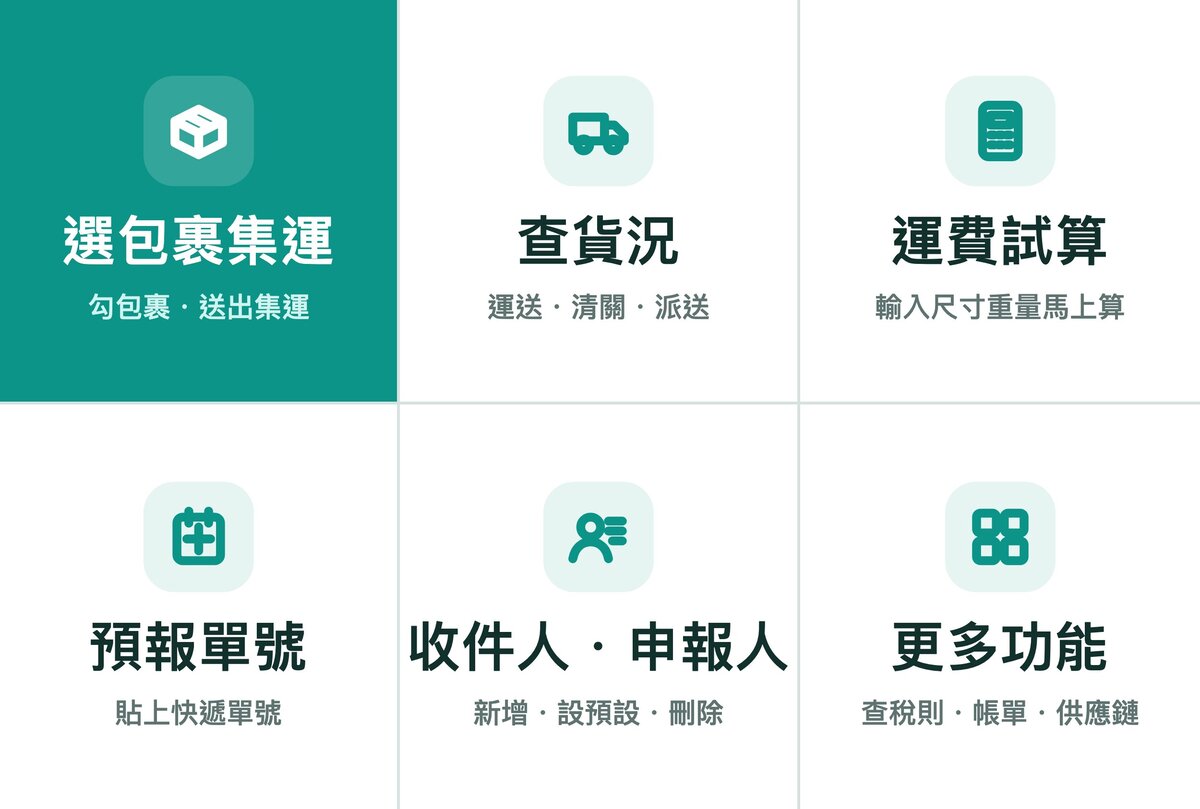
The HowBridge consolidation official account (unique ID @0523tw, LINE-verified) currently offers four kinds of features: ① Consolidation Assistant — once your account is linked, the “集運選單” (Consolidation Menu) below the chat has 6 tiles (選包裹集運 Consolidate packages / 查貨況 Track shipments / 運費試算 Shipping estimate / 預報單號 Add forecast / 收件人・申報人 Recipients · Declarants / 更多功能 More features); friends who have not linked yet see the “好運器選單” (HowBridge Menu: 綁定會員 Link membership / 運費試算 Shipping estimate / 怎麼使用 How to use / 下載 App Download the App / 問客服 Ask support / 語言 Language). You can also just type text commands such as consolidate, track, costs or forecast (or 集運, 貨況, 費用, 預報) — the rules are identical to the website's consolidation page; ② Proactive notifications — 9 kinds of events are pushed to your LINE, including packages arriving at the warehouse, consolidation status updates (packed → signed for), customs release, EZ WAY “declaration matches” reminders, packing quotes, value-added service completion and automatic consolidation waiting for item names, subject to a 22:00–08:00 quiet period and a daily limit per person; ③ Freight and tax calculator — no account linking required, just send one line with dimensions and weight to estimate Sea Express and Air Express rates; ④ Live customer service — available Monday to Friday, 09:00–18:00; outside these hours you'll get an automatic reply first, then a reply in order once support reopens. Consolidating, tracking, forecasting and managing recipients all require linking LINE to your account first.
HowBridge only operates a Shenzhen consolidation warehouse and a Taoyuan operations warehouse, and only provides China → Taiwan consolidation service; we have no warehouses in any other country, and we do not offer purchasing-agent (daigou) service. Every feature of the LINE official account is built around this single route: any package you can consolidate in LINE must already have been sent to, and checked in at, the Shenzhen consolidation warehouse.
How do I add HowBridge's LINE official account and link my membership?
The official account is named “HowBridge Consolidation Official Account,” with the unique ID @0523tw. You can add it via the LINE button in the bottom-right corner of any consolidation-related page on this site, or open line.me/R/ti/p/@0523tw directly. After adding it as a friend, “linking your account” is a prerequisite for using consolidation features and receiving notifications — HowBridge only recognizes people whose LINE account is linked one-to-one with a member account, to prevent someone else from getting hold of your parcel data. There are three ways to link:
| Method | Who it's for | Steps | Notes |
|---|---|---|---|
| Sign up as a new member with LINE | You don't have a HowBridge account yet | On the website login page, tap “Log in with LINE” → agree to authorization → fill in your Taiwan mobile number → done. During sign-up, LINE will separately ask whether to add the official account as a friend; you can decide for yourself. For how LINE login and other login methods are linked to the same account, see “How to log in to HowBridge”. | If the phone number is already registered to another account, the system will ask you to log in with your existing account instead; LINE linking then completes automatically after login — the two accounts are never merged just because they share a phone number. |
| Link LINE to an existing account | You already have an account (registered by email, Google or Apple) | Open 0523.tw/line/bind → log in your usual way → authorize LINE → see “Linking complete.” | The system never silently swaps out a LINE you've already linked; if this LINE is already linked to another member, you'll be taken to the account security page with a notice. |
| The personal link in the welcome message after adding as a friend | People who have added the account as a friend but not linked yet | Right when you add the friend, the welcome message includes a one-time link just for you → tap it, log in or sign up → linking complete. | The link works once and only for you — please don't forward it; blocking the official account invalidates it. Members who link this way will be asked to “verify by logging in with LINE” once more the first time they use the Consolidation Assistant in LINE, to confirm it's really you. |
The linking-complete page shows your current status: Linked and a friend (can receive notifications), One more step: add as a friend, Blocked (please unblock), or Not linked yet. The page has four buttons — “Add official account as friend,” “Open official account,” “I've added it, check again,” and “Back to LINE chat” — just follow them. You can also check the LINE currently linked at any time under “Account Security” in the Member Center.
The HowBridge consolidation official account has passed LINE's official business-document review. Under LINE Taiwan's update effective April 1, 2026, only verified official accounts display the verification badge; unverified general official accounts no longer show the marker once informally called the “grey shield.” Before adding as a friend, check that the ID is @0523tw and that the verification badge appears next to the name; for what the shield colors mean and a 3-step self-check, see “LINE Official Account Blue Shield Verification”.
What are the six tiles on the rich menu? How does it change once you link your account?
After adding it as a friend, open the chat with HowBridge and a rich menu (as LINE calls it) will appear above the keyboard, expanded by default. HowBridge shows two menus depending on whether you have linked your member account, both with 3 columns × 2 rows, six tiles in total: before linking you see the 好運器選單 (HowBridge Menu); once linking is complete, the system automatically switches you to the 集運選單 (Consolidation Menu). The consolidation features on the Consolidation Menu are completed right inside the LINE chat, with no separate webpage to open:
| Position | Button | What happens when tapped | Requires linked account? |
|---|---|---|---|
| HowBridge Menu · Top row, left | 綁定會員 (Link membership) | Opens the linking page; log in (or sign up) your usual way and authorize LINE to complete linking. | No |
| HowBridge Menu · Top row, middle | 運費試算 (Shipping estimate) | Goes straight to the freight and tax calculator; just send one line of "length width height weight". | No |
| HowBridge Menu · Top row, right | 怎麼使用 (How to use) | Opens this page. | No |
| HowBridge Menu · Bottom row, left | 下載 App (Download the App) | Opens the HowBridge App download page. | No |
| HowBridge Menu · Bottom row, middle | 問客服 (Ask support) | Sends "我想問客服" (I'd like to ask customer service) on your behalf; then just type your question, and a live agent replies during service hours. | No |
| HowBridge Menu · Bottom row, right | 語言 (Language) | Choose the language the assistant replies in. | No |
| Consolidation Menu · Top row, left | 選包裹集運 (Consolidate packages) | Lists your packages already “checked in” at the Shenzhen consolidation warehouse, all selected by default; then you enter the total goods value, confirm the details and submit the consolidation order (see the three steps below). | Yes |
| Consolidation Menu · Top row, middle | 查貨況 (Track shipments) | Replies with an overview card: how many packages are waiting to consolidate, how many batches are being packed, how many are in transit, and how many are forecasted; then lists every batch in transit (status, customs stage, tracking number, current clearance status, plus the estimated delivery date once released). | Yes |
| Consolidation Menu · Top row, right | 運費試算 (Shipping estimate) | Goes straight to the freight and tax calculator (this tile replaces the former "Check costs" tile); for the cost of completed consolidation orders, type the text command costs (or 查費用) or see the bills page. | Appears only after linking (the estimate itself needs no linking) |
| Consolidation Menu · Bottom row, left | 預報單號 (Add forecast) | Opens the keyboard directly with the forecast-number field already filled in; paste your courier tracking number(s) (multiple at once is fine) to complete the forecast. | Yes |
| Consolidation Menu · Bottom row, middle | 收件人・申報人 (Recipients · Declarants) | Shows how many recipients and declarants you currently have; you can add, set as default, or delete them. | Yes |
| Consolidation Menu · Bottom row, right | 更多功能 (More features) | The 更多功能 (More features) card: 查稅則 (Tariff lookup: tariff search page), 帳單支付 (Bills & payment: bills page), 稅單管理 (Tax documents: the “Customs” tab of the bills page, straight to your freight e-invoices), 已付歷史 (Paid history: the “History” tab of the bills page), 供應鏈管理 (Supply-chain management: the “Products” tab of the website consolidation page, i.e. your member product list) and 切換語言 (Switch language), plus a 到網站集運頁 (Go to website consolidation page) button; pages that need a login open with auto-login. | Yes |
Friends who have not linked yet see the “HowBridge Menu”, and all six tiles work without linking. If you type a consolidation text command such as consolidate (or 集運) or track (or 貨況), you'll get a “Please link your HowBridge account first” card, and its button takes you to the linking page. Once linking is complete, the system automatically switches your menu to the “Consolidation Menu”.
Per LINE's official documentation, the rich menu and quick-reply buttons only display in the iOS/Android version of LINE; they don't appear on the macOS/Windows desktop version. On a computer, just type the text commands from the next section instead; buttons on cards can still be tapped in the desktop version.
Can I operate it without the menu? What text commands are available?
Yes. The Consolidation Assistant only responds to messages that “exactly match a keyword” or “match a fixed prefix format”; any other text is treated as a request for customer service and is delivered to the support inbox as usual — the bot won't intercept it. In other words, typing just the keyword calls up the assistant, while typing a full sentence like “I have a question about consolidation” goes to customer service.
| What you want to do | What to type | Notes |
|---|---|---|
| Bring up the “More features” card | menu help main menu 選單 功能 集運助理 | Replies with the “More features” card (tariff lookup, bills & payment, tax documents, paid history, supply-chain management, switch language); if not linked, replies with the linking prompt card. |
| Consolidate packages | consolidate consolidation ship my parcels 集運 選包裹集運 我要集運 申請集運 | Same as the “Consolidate packages” menu tile. |
| Track shipments | track tracking status track parcel track my parcel where's my parcel 貨況 查貨況 我的集運 運送進度 | Replies with the overview card and the in-transit list. |
| Check the status of a specific tracking number | 查貨況:<單號> (track shipment: number) | The number must be at least 5 alphanumeric characters; only packages, consolidation orders and forecasts under your own account can be looked up. |
| Check costs | costs check costs my costs fees 費用 查費用 運費稅金 | Available when you have completed consolidation orders; to check a specific order use 查費用:<單號> (check costs: number, at least 4 characters). |
| Estimate freight | estimate shipping estimate calculate shipping 試算 試算運費 運費試算 算運費 | No account linking required; just send one line with “length width height weight” afterward. |
| Forecast a tracking number | forecast pre-alert add tracking number 預報 預報單號 | Then paste it using 預報單號:<單號> (forecast tracking number: number); separate multiple numbers with line breaks, spaces or commas, up to 20 at a time. |
| Manage recipients | recipient recipients 收件人 收件地址 | To add one, start with 新增收件人(宅配), 新增收件人(7-11) or 新增收件人(全家) (add recipient — home delivery / 7-11 / FamilyMart) and the system will pre-fill the form. |
| Manage declarants | declarant declarants 申報人 | To add one, start with 新增申報人(個人) or 新增申報人(公司) (add declarant — individual / company). |
| Fill in extra details mid-consolidation | 總貨值:<數字> 備註:<文字> (total goods value: number / note: text) | Only valid while a consolidation is in progress; notes are limited to 10 characters. |
If customer service has replied to you within the last 15 minutes and you then type a single keyword (for example, replying to support with just the word for “tracking”), the system treats it as your reply to customer service and won't trigger the assistant. While the assistant is handling a command, the question you were waiting on support for stays in the support inbox.
Every round of a flow has a flow code on its card; tapping a button on an old card returns a message saying the button has expired — please use the latest card instead. Each friend can take up to 60 actions per minute; a step waiting for your text input is valid for 10 minutes, and the whole flow is held for 30 minutes.
How do I send packages for consolidation in LINE? Three steps to finish
After tapping “Consolidate packages” or typing the keyword for consolidation, the assistant first checks that you have no “signed for but unpaid” bills (if you do, it will ask you to pay first), then lists the packages already checked in at the Shenzhen consolidation warehouse. The whole flow uses the same rules and the same order-submission program as the website's consolidation page — anything the website blocks, LINE blocks too.
1Confirm the packages to send (all selected by default)
The assistant replies with a summary card: item count, total weight, and the first 3 tracking numbers (the rest shown as “…N more”). Tap “Consolidate all (N)” to go straight to the next step; to pick specific packages, tap “Select packages individually” — each package gets its own card (tracking number, check-in time, item name, HS code, weight, size, package photos); use “Add this / Remove this” to adjust, then tap “Done selecting”. Up to 59 packages are listed at once; for more, please use the website.
2Enter the total goods value
When you tap the consolidate button, the keyboard opens automatically with the total-goods-value field pre-filled; enter the total price of the goods in this batch (in New Taiwan Dollars, up to 8 digits with up to 2 decimal places). This is usually the only field you need to type manually: the declaration type defaults to simplified declaration, the recipient defaults to your default recipient, the shipping method defaults to Sea Express, the declarant defaults to your first available declarant, and the duty collection method (home delivery) defaults to “Collected by HCT Logistics” — all of these can be changed afterward.
3Review the confirmation card and submit
The confirmation card is split into four groups: ① Declarant · Recipient ② Total goods value · Declaration type ③ Duty collection method ④ Shipping · Packaging · Note. To change anything, tap “Edit details”, which brings up quick replies for “Change recipient / Change declarant / Change value / Change declaration / Change tax method / Change shipping / Change packaging / Change note / Adjust packages”. Once everything looks right, tap the submit button (if you chose Tax+, the amount is shown right on the button), and the assistant replies with “Warehouse notified to pick and pack” and your consolidation number. Once submitted, the packages enter the consolidation process and this cannot be undone.
- Total goods value over NT$50,000: this exceeds the limit for express simplified declaration. As of September 15, 2026, switching to formal declaration is no longer mandatory, but if you still choose simplified declaration, you'll see a two-option card before submitting: “Reselect parcels and ship the rest another day” or “I accept the risk and submit with simplified declaration”.
- Total goods value under NT$800: duty collection can only be “Tax+” or “Collected by HCT Logistics”; if you choose HCT collection, the submit button changes to “Accept duty-free rules and confirm”.
- Declarant is a company (8-digit Tax ID): “Tax+” is unavailable, convenience store pickup can't be used, and tax is billed separately as assessed by customs.
- Convenience store pickup (7-11 / FamilyMart): total weight including a 100g packaging bag must not exceed 5,000g, only Sea Express is available, the only duty option is “Tax+”, and formal declaration cannot use store pickup.
- The Tax+ amount: calculated as the higher of “weight in kg × NT$20” or “total goods value × 5%”, and the submit button shows the exact amount.
- Formal declaration: a NT$800 customs declaration fee applies, only HCT Logistics home delivery is available, and the tax is collected and paid by HowBridge and added to your bill.
You can choose multiple packaging services: carton / wooden frame / waterproof bag / bubble wrap / corner protectors / stickers (actual cost is quoted by the warehouse; if it exceeds the base rate you'll be notified separately — see the notifications section below). For notes, choose from “Fragile / Valuable / Flammable / Batteries” or write your own up to 10 characters, which is printed on the picking list for the warehouse.
Confirmation cards carry a version number: any change you make (including removing a package or changing the total goods value) updates the version, and the submit button on an old card stops working — the assistant will ask you to check the new card and confirm again. This prevents submitting outdated data after something has changed.
How do I check tracking and costs in LINE?
Both “Track shipments” and “Check costs” pull from the same data as your account, matching the website's consolidation and billing pages — the assistant just formats it as cards for the chat.
Track shipments: overview card + in-transit list
The overview card lists how many packages are waiting to consolidate, how many batches are being packed at the warehouse, how many are in transit, and how many are forecasted, plus three buttons: “Consolidate packages” (only appears if you have packages waiting), “Search by number” (auto-fills the tracking-search field), and “Check costs”. Next, up to 10 in-transit consolidation orders are shown as carousel cards: status, customs stage, main tracking number, weight, current clearance status (estimated delivery date once released), the HCT numbers for the first 3 sub-orders, and the latest logistics event; tap “View detailed progress” to see the last 8 events for each sub-order (newest first), and “Copy HCT number” to copy it with one tap (requires LINE 14.0.0 or later). Batches being packed at the warehouse get a separate card, listing up to 6 batches.
Search by number: one number checks every stage
Enter 查貨況:<單號> (at least 5 characters), and the assistant checks in order: the main tracking number, sub-order number, HCT number or courier tracking number of an in-transit order → batches being packed at the warehouse → your packages (by courier tracking number, replying claimed / checked in / value-added service in progress / consolidating / dispatched / returned) → forecasts (showing how many days until auto-deletion) → consolidation orders. If nothing matches, it replies “not found” and reminds you that only data under your own account can be searched.
Check costs: completed consolidation orders only
When you tap “Check costs”, if you have completed (signed-for) consolidation orders, you can choose “Costs of completed orders” to see the most recent 10, each as its own cost card: bill date, paid/unpaid, billable weight, freight for this order (noting Tax+ or tax billed separately), tax (only listed for company declarations), oversize fee breakdown, service fee (company), and total, plus “Cost per package” (up to 20 items) and “View bill” (auto-login to the billing page) buttons. Orders under an individual declaration note “any tax is collected separately by customs and is not included in the cost of this order”. Use 查費用:<單號> to look up a specific order directly; if several match, choose using the quick replies.
Freight and tax calculator: no account linking needed
Type the keyword for “estimate” and then send one line with “length width height weight” (for example 60 40 30 5), and the assistant replies with a freight card showing Sea Express and Air Express side by side; if the size counts as oversized, you'll first be asked to pick a delivery zone via quick reply. Tap “Calculate tax too” → enter the total goods value (in New Taiwan Dollars) → enter the item name → the assistant lists 5 candidate HS codes (the first marked “AI recommended”; type a number 1–5 to choose) → replies with a tax card and the “estimated total (freight + tax)”. The AI HS-code lookup is limited to 20 uses per friend within 10 minutes; if you don't respond within 15 minutes it ends automatically, and you can type “cancel” at any time. The full calculator is on the freight estimate page.
How do I forecast a tracking number and manage recipients and declarants in LINE?
These three features let you get your information ready in advance so you don't have to fill it in again when consolidating; the rules are the same as the website's Member Center.
Forecast a tracking number: just paste it, up to 20 at a time
Tap “Add forecast” or type the keyword for “forecast”, and the keyboard pre-fills the forecast-number field; paste your courier tracking number(s) after it (separate multiple numbers with line breaks, spaces or commas, 6–40 alphanumeric characters each; full-width characters convert to half-width automatically). The assistant processes them one by one and reports “Processed N, K succeeded”: a number already forecasted shows a notice that it can't be added again; a number for a package already checked in doesn't need forecasting (go straight to consolidation); and if the warehouse has already received it but it hasn't been assigned to an account yet (unclaimed), it's automatically claimed to your account. A forecast that hasn't checked in within 15 days is deleted automatically.
Recipients: home delivery, 7-11 or FamilyMart
Tap “Recipients · Declarants” → “Recipients” to see up to 11 entries (type, whether it's the default, name, masked phone number, address or store), each with “Set as default” or “Delete”. When adding one, choose home delivery / 7-11 / FamilyMart, and the keyboard pre-fills a form (name, phone, address or store), with a confirmation card before submitting. Rules: name 2–10 characters, phone number starts with 09 and has 10 digits, home delivery addresses must resolve to a recognizable city/county and district, and convenience store lookups accept a store number or store name (if more than 10 stores match, be more specific; when several match, choose from a carousel). The first entry is set as default automatically; a recipient already used on a consolidation order cannot be deleted; deleting the default hands the role to the next remaining entry.
Declarants: individual or company
For an individual declarant, fill in the name, phone number, and National ID or Resident Certificate number (with check-digit validation); for a company declarant, fill in the company name, 8-digit Tax ID (with check digit) and phone number. Both the assistant's cards and the customer service backend records automatically mask the ID number, but LINE chat itself can't mask the line of text you actually typed — if that concerns you, the card has a “Fill in on the website” button. A recipient or declarant added partway through a consolidation is automatically returned to the next step of consolidation once saved.
What proactive LINE notifications does HowBridge send, and when?
Aside from the “Forecasted package has arrived (not linked)” reminder, proactive notifications are only sent to LINE accounts that are “linked to a member and a friend of the official account”; if your member account is linked to a LINE group (for example, shared by coworkers), the notification goes to that group instead. There are currently 9 events the system sends proactively (“Automatic consolidation waiting for item names” was added on 2026-09-21; there is also a reminder before member points expire, which is not listed in the table below):
| Notification | When it's sent | Content | Quiet period | Daily limit |
|---|---|---|---|---|
| Package checked in | When your courier tracking number is checked in at the Shenzhen consolidation warehouse and assigned to your account | 包裹已入倉 (package checked in) card + tracking number, weight and a dedicated URL for each item; multiple items within 90 seconds are merged into one | Delayed | Counted |
| Package status update | A consolidation order enters 已打包 (Packed) / 裝櫃運輸中 (Loaded, in transit) / 清關中 (Clearing customs) / 派件中 (Out for delivery) / 已簽收 (Signed for) | Status card + tracking number + “View details”; multiple items for the same member within 90 seconds are merged; the same package at the same status is sent only once within 30 days | Delayed | Counted |
| Customs release | The system checks with customs every 4 hours; sent when release is found | 包裹清關放行 (package cleared customs) card + order number and clearance number, noting delivery is coming up | Delayed | Counted |
| EZ WAY “declaration matches” reminder | When the customs broker has filed the declaration with customs and you need to tap “declaration matches” in the EZ WAY app | Text message: declaration number and how to proceed, with a link to the EZ WAY tutorial | Not delayed | Exempt |
| Packing quote exceeds the base rate | When the actual cost of packing materials entered by the warehouse is higher than the base quote | Consolidation number + each packing material's “base quote → actual amount” and total | Not delayed | Exempt |
| Value-added service completed | When a work order such as photographing, counting, return shipping or barcode labeling is completed | Title (e.g. 拍照已完成, photos completed) + courier tracking number + “View result” link | Not delayed | Counted |
| Forecasted package has arrived (not linked) | When you've provided a tracking number in chat and the package has arrived, but LINE isn't yet linked to a member account | A reminder to reply with your Taiwan mobile number or claim it yourself after linking; deliberately omits the tracking number | Not delayed | Also has duplicate-send prevention |
| Unclaimed warehouse package reminder | Sent manually by warehouse staff when a package can't be matched to a tracking number | Please complete claiming on the “Claim” tab of the consolidation page | Not delayed | Counted |
| Automatic consolidation waiting for item names | When you've turned on automatic consolidation on the consolidation page and the conditions are met, but some packages don't yet have an item name / tariff code (the system holds off on submitting) | Lists the tracking numbers missing item names (up to 5; the rest are shown as “…and N more”) and asks you to go to “Consolidation → Awaiting consolidation” and use the item-name field to search and select a tariff item name; once filled in, the scheduler submits automatically; the same batch of missing items is reminded only once within 24 hours | Not delayed | Exempt |
Check-in, package status update, customs release and EZ WAY “declaration matches” reminder notifications use a single-channel chain: if you have the HowBridge App installed (iPhone/Android) and the push notification delivers successfully, only the App is pushed; LINE is only used if you don't have the App; Email is only sent if you don't have LINE either (or the LINE send fails). So members with the App installed usually won't get the same status notification again on LINE — that's not a missed notification. For how the four channels divide the work, see the next section, “Which channel will a notification use?”.
To avoid disturbing you late at night, check-in, status-update and customs-release notifications during 22:00–08:00 Taipei time are delayed and sent the next morning (App, LINE and Email are all held together; customs release is sent in the next round of the 4-hourly check). In addition, the same recipient receives at most 3 proactive LINE notifications per day; the “EZ WAY declaration matches reminder”, “packing quote” and “automatic consolidation waiting for item names” notifications that require you to act are not subject to this limit. The limit is a setting chosen by the site, not a legal requirement.
There used to be a passive-reply feature that “automatically replied with a status card when you sent a screenshot of a courier tracking number”; this has currently been suspended by the site. To check tracking status, please use “Track shipments” in the menu or the command 查貨況:<單號>; messages sent to customer service are still answered by a person during service hours.
Period: 2026-09-01 00:00 – 2026-09-23 24:00 (Taipei time, 23 days). Data comes from HowBridge's LINE sending records and counts only the 9 proactive notification types in the table above (not the Consolidation Assistant's reply messages):
- 217 proactive notifications were actually sent to LINE, and the LINE platform accepted 216 (99.5%); the 1 not accepted was because the recipient was not a friend of the official account at the time.
- Another 6 check-in notifications were skipped by the system and not sent because the recipient had already reached the limit of 3 that day (not included in the 217).
- By event (number accepted): customs release 100, package check-in 82, package status update 21, EZ WAY reminder 6, value-added service completed 4, packing quote 1, forecasted package arrived 1, unclaimed warehouse package reminder 1; “Automatic consolidation waiting for item names” only launched on 9/21 and had not been sent yet during the period.
LINE, App, Messenger, Email: which channel will consolidation notifications use?
HowBridge's principle is “notify you only once about the same thing”. For four types — check-in, package status update, customs release and EZ WAY reminder — notifications follow the order App push → LINE → Email and are sent only through the first channel available; packing quote, value-added service completed, unclaimed warehouse package, forecasted package arrived and automatic consolidation waiting for item names are currently sent on LINE only. Facebook Messenger is not part of the automatic notification order. The differences between the four channels are:
| Channel | When you'll receive it | Requirements | Quiet period / daily limit | Can you reply or take action? |
|---|---|---|---|---|
| HowBridge App push (iPhone/Android) | The first choice for check-in, status update, customs release and EZ WAY reminder: if a usable device exists, only the App is pushed | Log in to the App and allow notifications; after logging out, uninstalling or changing phones, push to that device stops working (the system automatically switches to the next channel) | Check-in / status / release held 22:00–08:00; the limit of 3 per day does not apply to the App | Tap the notification to open the HowBridge App |
| LINE official account (@0523tw) | The main channel when you don't have the App; 5 more notification types are sent on LINE only (packing quote, value-added service completed, unclaimed warehouse package, forecasted package arrived, automatic consolidation waiting for item names) | LINE is linked to your member account and you're a friend of the official account (not blocked); if the member account is linked to a LINE group, notifications go to the group | Check-in / status / release held 22:00–08:00; 3 per person per day (reminders, quotes and item-name notices are exempt) | Yes: card buttons, the menu and text commands let you check tracking and consolidate directly; tap “View details” to open the website without logging in (see Login-free access inside LINE) |
| The last resort when you have no App and no usable LINE recipient (or the LINE send fails) | Your member profile has a valid email; if you signed up with LINE and LINE didn't provide an email, the system creates a placeholder address and won't send mail | Check-in / status / release held 22:00–08:00; if LINE was blocked by the quiet period or the daily limit, it will not fall back to Email | The email contains a link; you'll need to log in to the website | |
| Facebook Messenger | No automatic push for check-in, release or status updates; the Page chat has the same Consolidation Assistant and live customer service as LINE, and customer service can manually send the EZ WAY reminder to Messenger within the window | Messenger is linked to your member account; under Meta's policy, businesses can only reply within 24 hours of your last message, after which they can't message you proactively | Not applicable (not an automatic notification) | Yes: Consolidation Assistant commands and live customer service; see “HowBridge Facebook Page & Messenger guide” |
Whether an App push was “sent successfully” is reported by Apple's / Google's push services; if you turn off HowBridge under “Settings → Notifications” on your phone, the push service usually still reports a successful send, and the system has no way of knowing you didn't see it, so it will not switch to LINE. If you'd rather get notifications on LINE, log out of the App (logging out cancels this phone's push token), and later notifications will go to LINE; for iPhone notification settings and troubleshooting, see “HowBridge iPhone/iPad App guide”; for full troubleshooting steps on iPhone and Android, see “HowBridge app notifications not arriving? Troubleshooting”.
Getting the same thing once each on the App, LINE and Email only teaches people to ignore notifications. The site's “single-channel chain” also keeps the LINE official account's monthly free push quota (3,000 messages on the medium-volume plan) for members who really don't have the App. Under LINE's official billing rules, proactive pushes count toward the quota “by the number of people they are sent to”, while reply messages don't count, so “Track shipments” in LINE is always available.
Why do I sometimes not get LINE notifications?
The reason you're missing a notification can almost always be found in the table below; check it from top to bottom:
| Situation | Reason | What to do |
|---|---|---|
| Added as a friend but account not linked | The system doesn't know whose LINE this is and can't match it to any packages | Complete linking using the personal link in the welcome message or the linking page |
| Account linked but the official account was blocked at some point | LINE doesn't deliver to blocked accounts; once the system receives the block report, it marks your friend status as “Blocked” | After unblocking, go to the linking-complete page and tap “I've added it, check again”; the system also automatically re-checks friend status every day at 9:30 am |
| The HowBridge App is installed | Notifications use a single channel; once a push to the App succeeds, LINE is no longer sent | Check the App's notifications instead; this is by design, not a missed delivery |
| Between 10pm and 8am | Quiet period — check-in / status / release notifications are delayed | They'll be sent after 8am |
| Already received 3 that day | Daily limit per person | Check-in/status notifications blocked that day are not resent — the limit resets the next day; customs release is sent in the next round of checks; reminder-type notifications aren't limited. You can always check with “Track shipments” |
| A company or family shares one account, and LINE is linked to a group | Notifications go to the linked group, not your personal chat | Check the group, or ask customer service to confirm who the account is linked to |
| A particular notification type was temporarily turned off by the site | Every proactive notification has its own switch (for example, during maintenance) | Please contact customer service to confirm |
| The official account has used up its monthly message quota | HowBridge uses LINE's medium-volume plan, with 3,000 free pushes per month and no option to buy more; LINE rejects proactive pushes once it's used up. LINE has announced that from November 1, 2026 the medium-volume monthly fee will change from NT$800 to NT$1,000 (excluding tax), with the 3,000 free messages unchanged; this site's notification rules are not affected | You can still check status anytime with “Track shipments” (the assistant's replies use the free reply channel and aren't affected by the quota) |
| Logged out of the App, uninstalled it or switched to a new phone | App push is tied to “that specific phone”; logging out cancels the push token, and after uninstalling, the push service reports it invalid and the system removes it automatically | Log in to the App on the new phone and allow notifications; until then, check-in / status / release notifications automatically go to LINE (Email only if there's no LINE) |
Member-page links such as “View details” and “View bill” on notification cards and assistant cards open with you logged in directly inside LINE through LINE's LIFF mechanism; for the process, which pages it applies to and how secure it is, see the next section, “Why don't I need to log in when I tap a LINE notification?”.
Why don't I need to log in when I tap a LINE notification? How does login-free access inside LINE (LIFF) work, and is it safe?
Since September 20, 2026, member-page links on HowBridge notification and assistant cards open inside LINE through LIFF (LINE Front-end Framework, LINE's official platform for web pages inside LINE). According to LINE's official documentation, when a web page opens in LINE's in-app browser, it can get user data without asking the user to log in again — so when you tap “View details” you go straight to your own consolidation page without entering a username and password. The table below first lists which links this applies to, followed by the four steps of the whole process.
| Page type | Examples | Logs in automatically? |
|---|---|---|
| Member pages that require login | Consolidation, claiming, bills, member center, dashboard, single-package page | Yes: opened via login-free access inside LINE |
| Public pages | Tariff lookup, EZ WAY tutorial, freight calculator, this guide | No: kept as regular URLs, avoiding an extra authorization screen |
| LINE not yet linked to a member account | Any member-page link | Shows “This LINE account isn’t linked to a member account yet” and a “Link or create a member account” button, leading to the linking page |
1Tap a link in a notification inside LINE
For example, “View details” on a status card, the dedicated link for each package in a check-in notification, or “View bill” on a cost card. These links first open a transition page inside LINE that shows “Connecting to LINE…”.
2LINE hands over the identity credential you've authorized
The first time, LINE may show an authorization consent screen, and it only continues after you agree. LINE then gives HowBridge a signed identity credential (ID token), and the screen shows “Checking your member account…”.
3HowBridge verifies this credential with LINE
HowBridge sends the credential to LINE's official verification endpoint to check its signature, expiry and intended recipient, then checks the issuer itself; names, profile pictures and other data sent from the web page's front end are never trusted. Once verified, the LINE user ID is used to find the member linked to it.
4Matched to the linked member, logged in automatically and the target page opens
After the screen shows “Signed in. Opening the page…”, you're taken to the page you wanted. The target page only accepts HowBridge on-site paths and will never send you to an external website.
The transition page states: we only receive your user ID and display name from LINE to match your member account; we never receive your LINE password or chat messages. Your identity is confirmed by LINE's official verification endpoint, which is also why this site doesn't trust front-end data.
According to LINE's official documentation, when a LIFF URL is opened outside LINE it tries to jump back to the LINE app, but LINE does not guarantee which environment it finally opens in; some features are unavailable when running in a regular browser (Chrome, Safari, etc.). In practice you may first see LINE's login authorization page, and after logging in to LINE you'll likewise be matched to your linked member account.
The screen explains the reason and offers buttons: the LINE authorization has expired — the system first retries automatically once, and if it still fails, tap “Try again”; LINE's servers can't be reached right now or the LINE component failed to load — check your connection and try again; you can also tap “Open HowBridge in a browser instead” and log in to the website the usual way.
How does live customer service on LINE work? What is the automatic reply?
The official account also serves as a customer service channel. Any message you send (other than the commands above) goes into the support inbox and is answered in order by a person during service hours; the Consolidation Assistant and live customer service are two separate paths that don't interfere with each other.
Live customer service hours are Monday to Friday, 09:00–18:00 (Taiwan time); closed on weekends and public holidays. See “Contact Us” for other ways to reach us. If you message outside service hours, you'll first get an automatic reply from the official account noting that it's currently outside service hours; your message is still kept and answered in order once support reopens.
As soon as you add the account as a friend, you'll get a text welcome message: if you haven't linked your account yet, you'll receive a one-time personal linking link; if you're already linked, it will confirm “Your LINE is linked to a 0523.tw account”. The message also explains the notifications you'll receive after linking, and that freight bills can be paid online via LINE Pay, JKOPay, PXPay Plus, Apple Pay, Google Pay, credit card, convenience-store payment codes and more (see the full list in “Payment Methods”). The welcome message isn't sent again for the same event within 1 hour.
HowBridge will never proactively add you as a friend from a personal LINE account, never ask you to transfer freight or tax payments to a personal bank account (for tax that HowBridge collects and pays on your behalf in formal declarations, you'll only ever be asked to pay by the methods listed on the billing page), and never ask for your online banking password, full credit card details or verification codes on LINE. Every payment step in the Consolidation Assistant only ever directs you to this site's billing page — it never collects payment inside the chat. If you receive a suspicious message, please read “The Complete Guide to Preventing Cross-Border Shopping Fraud” first, or call the 165 anti-fraud hotline.
What data is used to link LINE and receive notifications?
Under Article 8 of the Personal Data Protection Act, when personal data is collected the purpose of collection, the categories of data, how it will be used, and the data subject's rights must be disclosed; here's the data and purposes actually involved in LINE-related features:
| Data | When it's obtained | Purpose | What you can do |
|---|---|---|---|
| LINE user ID (userId) | Provided by LINE authorization when you log in with LINE or link your account | Maps LINE to your member account, to decide who to send notifications to and whose account data the assistant should reply with | Unlink it under “Account Security” in the Member Center |
| LINE display name, profile picture, email (if you agree to share it) | When you log in with LINE | Used to create your member profile; if LINE doesn't provide an email, the system creates the account with a placeholder address | Can be edited in the Member Center |
| Friend status (added / blocked) | On add-friend and block events, and an automatic check every day at 9:30 am | Notifications aren't delivered to accounts that haven't added the account as a friend or have blocked it | Restored as soon as you unblock |
| What you type in the chat | When you send a message | Commands are handled by the assistant; other messages go to the support inbox for a person to reply to | Declarant ID numbers are automatically masked in customer service records; if that concerns you, you can fill them in on the website instead |
| Package and consolidation order data | Already stored in your member account | Used to build tracking cards, cost cards and notification content | Notifications don't include sensitive fields like ID numbers; check-in reminders deliberately omit the tracking number |
Consolidation data includes recipient names, addresses, National ID numbers (used for declarations under your real name), tracking numbers and costs — exactly what an impersonator would want most. That's why HowBridge only recognizes a link where the LINE account and the member account match one-to-one, byte for byte. People who link via the personal link are asked to verify once more by logging in with LINE the first time they use the assistant, because a link can be forwarded to someone else. If an account has gone more than 30 days without completing identity linking, the assistant will first ask you to finish it on the Account Security page, matching the rule used on the website.
The verification badge on a LINE official account proves that “the account is backed by a government-approved business” — this is LINE's own self-regulatory review system. Taiwan's Fraud Crime Hazard Prevention Act, promulgated in 2024, targets online advertising platform operators (who must verify advertisers' identities and take down fraudulent ads); it doesn't directly require instant-messaging services to verify the real identity of every official account. So “having the verification badge” confirms the account is genuine, not that every message's content is necessarily accurate — the two experimental studies cited at the end of this page reach the same conclusion.
What are the current limitations of the LINE Consolidation Assistant?
The following reflects the situation as of September 20, 2026; this page will be updated as features change:
| Limitation | Reason | Workaround |
|---|---|---|
| Desktop LINE has no rich menu or quick replies | LINE's own restriction: display is limited to iOS/Android | Type text commands instead; card buttons still work |
| “Open keyboard with pre-filled text” requires LINE 12.6.0 or later; “one-tap copy” requires 14.0.0 or later | LINE's official feature version requirements | Update the LINE app, or type manually |
| Up to 59 packages waiting for consolidation are listed at once, up to 20 forecasts at a time, and up to 11 recipients are shown | Limits of chat card capacity and readability | Use the website if you exceed these |
| Checking costs only works for “completed” consolidation orders | Matches the scope of the “History” tab on the website | See the billing page for costs of orders in progress |
| A declarant's ID number can't be masked in the chat | LINE chat itself doesn't offer masking | Use the “Fill in on the website” button on the card |
| The rich menu image and the field names on the add-new forms are currently in Chinese | Foreign-language versions are still being completed | The rest of the text for foreign-language members is already available in 14 languages |
| Before you link your membership account, the "Your parcel has arrived at the warehouse" notification and the friend-add welcome message are shown in Chinese | The system doesn't yet know your language (your member language is only set after you link your account) | After linking your membership account and setting your language in the Member Center, proactive notifications and assistant replies will display in your language (14 languages) |
| Members who log in with a Google account can't complete Google login in LINE's in-app browser | Google doesn't allow account login inside an in-app browser | Open 0523.tw/line/bind in an external browser (Safari/Chrome) to complete linking instead |
| Checking multiple freight quotes at once, or paying inside LINE | Not yet available | Use the website's estimate page for freight; use the billing page for payment |
Glossary
- Rich Menu
- A clickable image menu above the keyboard in a LINE official account's chat. Per LINE's official specs, the image is 800–2500 pixels wide with up to 20 tappable areas; HowBridge has two 2500×1686 six-tile menus: the “HowBridge Menu” shown by default to friends who have not linked yet, and the “Consolidation Menu” applied individually after you link your account. Not shown in the desktop version of LINE.
- Consolidation Assistant
- A chatbot feature HowBridge provides inside its LINE official account, using the rich menu, card buttons, quick replies and pre-filled input fields to let you consolidate packages, track shipments, check costs, forecast tracking numbers, and manage recipients/declarants right in the chat; it shares the same underlying program with the website.
- Reply and Push
- The two ways LINE's Messaging API sends messages. A Reply answers a message you just sent and, under LINE's official rules, doesn't count toward the monthly message quota; a Push is sent proactively by the system and does count toward the quota. The Consolidation Assistant almost always uses Reply (a Push is only sent once as a backup if the reply to a successful order submission fails), while proactive notifications always use Push.
- Medium-Volume Plan
- One of LINE official account's promotional plans in Taiwan, providing 3,000 free push messages per month with no add-on purchases available; the monthly fee changes from NT$800 to NT$1,000 (excluding tax) starting November 1, 2026. HowBridge currently uses this plan.
- Quick Reply
- A row of small tappable buttons below a message, up to 13 per message, shown only in the mobile version of LINE; the Consolidation Assistant uses them to let you choose a warehouse, change consolidation details, or pick a store.
- fillInText (pre-filled input)
- A feature supported from LINE 12.6.0 onward: tapping a button automatically opens the keyboard with text pre-filled (for example, the total-goods-value or forecast-tracking-number fields), so you just continue typing the rest.
- LIFF Auto-Login
- LINE Front-end Framework. In-site links on notifications and cards open through LIFF, where LINE hands your already-authorized identity to the website for verification, and you're logged in automatically once it matches your linked account.
- EZ WAY Declaration Matches
- “EZ WAY,” a real-name verification app built and operated by Trade-Van with its own investment and incorporated by the Customs Administration, Ministry of Finance into the online authorisation mechanism (not commissioned by Customs); customer service is provided by Trade-Van. Starting March 1, 2026, a customs broker first pushes declaration information via EZ WAY, and you must confirm “declaration matches” to complete the authorization before customs clearance can proceed; HowBridge sends LINE reminders for this.
- Simplified Declaration and Formal Declaration
- Express cargo can clear customs using a simplified declaration form under certain conditions (this site uses a total goods value of NT$50,000 as the reference threshold); formal declaration is handled using a regular import declaration, with HowBridge charging a customs declaration fee and collecting and paying the tax on your behalf.
- Tax+
- One of this site's duty collection methods: at submission, the higher of “weight in kg × NT$20” or “total goods value × 5%” is estimated as tax and bundled into the freight; convenience store pickup can only use this method; it's not available to company declarants.
- Quiet Period
- This site's notification policy: check-in, status-update and customs-release notifications are delayed between 22:00–08:00 Taipei time and sent the next morning instead; notifications that require you to take action are not affected.
- Single-Channel Chain
- This site's notification delivery principle: App push → LINE → Email — only the first available channel is used, to avoid receiving the same thing three times.
- ID token (identity credential)
- A signed piece of data LINE gives a web page after LINE login, containing the user ID and an expiry time. HowBridge only trusts ID tokens confirmed by LINE's official verification endpoint, and uses them to match the linked member.
- Messenger 24-hour messaging window
- Meta's policy for Facebook Messenger: businesses must reply within 24 hours after the user sends a message; outside the window, message tags may only be used for approved purposes. For this reason HowBridge doesn't use Messenger for automatic tracking notifications, and customer service only sends messages manually within the window.
Sources and Limits of Verification
This page's feature rules are checked item by item against the live behavior of the site (first written 2026-09-20; notification events, notification channels and login-free access inside LINE were re-checked during the 2026-09-24 expansion); LINE platform limitations are taken from LINE's official developer documentation and Taiwan official-account announcements; legal citations are taken from the current text in Taiwan's national law database; and peer-reviewed literature is added to explain “why it's designed this way.”
LINE Official Documentation and Legal Basis
- LINE Developers〈Rich menus overview〉: the rich menu is only displayed in the iOS/Android version of LINE and not on desktop (macOS/Windows); an individual user's menu can only be linked to someone who has already added the account as a friend; images must be 800–2500 pixels wide with up to 20 tappable areas (Messaging API reference). This page's “Consolidation Menu” is 2500×1686 with six tiles.
- LINE Developers〈Use quick replies〉: up to 13 quick-reply buttons per message, supported only in the iOS/Android version of LINE.
- LINE Developers〈Messaging API reference — Postback action/Clipboard action〉:
inputOption: openKeyboardcombined withfillInText(up to 300 characters) can pre-fill the input field, requiring LINE 12.6.0 or later; one-tap copy (clipboard action) requires LINE 14.0.0 or later. - LINE Developers〈Messaging API reference — Send reply message〉: the reply token must be used within 1 minute of receiving the webhook. 〈Flex Message — Carousel〉: a carousel can hold up to 12 cards.
- LINE Developers〈Messaging API pricing〉: push/multicast/broadcast/narrowcast count toward the monthly quota, reply does not; the quota is counted by number of recipients; sending to a blocked or non-existent userId doesn't count; when the quota is used up the API returns 429, with the original error message shown in 〈Messaging API reference — Error messages〉: “You have reached your monthly limit.”
- LINE Biz-Solutions Taiwan〈2026 LINE Official Account Plan Price Adjustment〉(2026-09-01): starting 2026-11-01, the medium-volume monthly fee changes from NT$800 to NT$1,000, and the high-volume fee from NT$1,200 to NT$1,400 (excluding tax); the free monthly messages for light, medium and high volume remain unchanged at 200/3,000/6,000, and light/medium volume plans cannot purchase add-ons; it's recommended to complete payment setup by 10/27, since the plan can't be changed during backend maintenance windows on 10/28–11/2 and 11/24–25.
- LINE Biz-Solutions Taiwan〈LINE Official Account〉product page, “Message fees”: one-on-one chat messages, automatic-reply messages, the welcome message sent on adding a friend, and the Messaging API's Reply feature don't count toward message fees; billing uses Japan Standard Time (GMT+9), so messages sent from 23:00 Taiwan time count toward the next day.
- LINE Developers〈LINE Developers Console overview〉: the same LINE user gets a different userId under different Providers; for the Messaging API and LINE Login to share a userId, they must be built under the same Provider. (This is the technical prerequisite that lets this site match a LINE Login identity to an official-account friend.)
- LY Corporation〈LINE Notify Service-End Announcement〉: LINE Notify ended service on 2025-03-31; LINE officially recommends switching to the Messaging API of a LINE official account for sending notifications.
- LINE Biz-Solutions Taiwan〈Official Account Verification Shield Update: Easier for Customers to Recognize, Safer to Interact〉(2026-04-01): starting 2026-04-01, unverified (general) official accounts no longer show the marker once informally called the “grey shield”; the verification badge for verified official accounts has been updated to green and blue checkmark icons; since March 2026, the chat of an unverified account permanently pins the notice “This official account is auto-replying to messages.”
- LINE Biz-Solutions Taiwan〈Four Advantages of a Verified LINE Official Account Every Brand and Business Should Know〉(2025-07-01): a verified official account must pass LINE's review using documents from a government-approved business, store or organization, and must first obtain a unique ID (Premium ID).
- LINE Official Account Help Center〈What Types of Accounts Are There?〉: a verified account shows a verified marker and can appear in LINE App search results; unverified accounts do not appear in search results; verification review is currently only accepted for Japan, Taiwan and Thailand.
- LINE Taiwan press release〈LINE Celebrates 14 Years, Connecting Everyday Life Through Communication〉(2025-06-23): LINE has 22 million users in Taiwan, sends over 1 billion messages per day, and has 10 million daily active groups.
- Personal Data Protection Act, Articles 3, 8, 19 and 20 (Laws & Regulations Database of The Republic of China): Article 8 requires that, when collecting personal data, the collector's name, the purpose and categories of collection, the period, area, recipients and method of use, the data subject's rights, and the impact of not providing the data must all be clearly disclosed; Article 19, Paragraph 1, Subparagraph 2 (“a contractual or quasi-contractual relationship with the data subject”) and Subparagraph 5 (“consent of the data subject”) are conditions under which a non-government agency may collect data; Article 20, Paragraphs 2 and 3 require that when personal data is used for marketing, use must stop as soon as the data subject objects, and the first instance of marketing must provide a way to opt out. The effective date of the amendment promulgated on 2025-11-11 is to be set by the Executive Yuan (as of this page's data-collection date it is still marked “effective date: to be determined”), and the articles cited on this page are not part of that amendment.
- Fraud Crime Hazard Prevention Act, Articles 2, 3, 27, 30–32 and 39 (promulgated 2024-07-31, amended 2026-01-21): online advertising platform operators above a certain scale must verify the identity of advertisers and funders using methods such as digital signatures (§30); ads must be labeled as ads and disclose the funder (§31); operators must remove fraudulent ads once aware of them and provide information such as the messaging-app accounts embedded in the ad to judicial police agencies (§32); violators are fined NT$500,000 to NT$10,000,000 by the competent digital-economy authority, up to NT$100,000,000 for serious cases (§39). The Act's target is online advertising platforms, and it does not directly require instant-messaging services to verify the real identity of every official account.
- Ministry of Digital Affairs Announcement〈List of Online Advertising Platform Operators That Meet a Certain Scale〉(2024-09-16, Ref. No. 11340007344): under Article 27, Paragraph 3 of the Fraud Crime Hazard Prevention Act, Google LLC, LY Corporation (LINE), Meta Platforms, Inc. and TIKTOK PTE. LTD. are announced as regulated operators.
- Ministry of Digital Affairs press release〈moda Partners with Google, LINE and Meta to Strengthen Anti-Fraud Measures Online〉(2024-08-30): LINE stated that, as of the end of July 2024, it had suspended 10,419 accounts involved in fraud, and has added the warning “Please be aware of potential fraud in this chat” to one-on-one chats, groups, personal profiles, Timeline, and one-way official-account communications.
- Executive Yuan press release〈Premier Chen Approves the “New Four Anti-Fraud Laws”〉(2024-05-09): the draft Fraud Crime Hazard Prevention Act, the draft Technology Investigation and Protection Act, and the amendments to the Communication Security and Surveillance Act and the Money Laundering Control Act are collectively called the “New Four Anti-Fraud Laws”; legislation was completed in July 2024.
- National Police Agency, Ministry of the Interior, FAQ〈Is There a Call Charge for the 165 Anti-Fraud Consultation Hotline?〉: calling 165 from a landline is free; from a mobile phone it's free on Chunghwa Telecom and NT$1 per minute on other carriers; you can also file a report online at the 165 Anti-Fraud website. Per the NPA FAQ〈What Channels Can I Use to Get the Latest Anti-Fraud Awareness Information?〉, the NPA's official anti-fraud awareness LINE official account ID is @tw165.
- Customs Administration, Ministry of Finance〈Express Consignee Real-Name Verification — Introduction and Instructions〉: EZ WAY real-name verification links a mobile number to a National ID or Resident Certificate number to complete real-name verification; one phone number can only be linked to one ID number; once a customs broker files a declaration, the individual should check the item name and amount, and tap “declaration matches” if correct.
- Customs Administration, Ministry of Finance press release〈Attention Online Shoppers: Customs Fully Implements Pre-Confirmed Authorization Starting March 1〉: the Ministry of Finance amended the Regulations Governing Customs Clearance of Air and Sea Express Cargo on 2026-02-23; starting 2026-03-01, individual simplified-declaration express cargo authorized online via EZ WAY real-name verification is fully subject to “pre-confirmed authorization”; import clearance cannot proceed without a response, or if the declaration doesn't match.
- Regulations Governing Customs Clearance of Air Express Cargo, Articles 11, 12 and 17 (amended 2026-02-23): cargo with a duty-paying value over NT$50,000 is high-value express cargo and must be cleared using a regular import/export declaration (§12, Paragraph 1, Subparagraph 1); other cargo may be cleared using a simplified declaration form (§12, Paragraph 2); authorization must be made by one of three methods — in writing, via the Customs-Port-Trade Single Window, or via a real-name verification platform (§17, Paragraph 1); customs may refuse to accept a declaration if authorization is not completed (§17, Paragraph 2, effective 2026-03-01). For sea freight, see the corresponding articles of the Regulations Governing Customs Clearance of Sea Express Cargo.
- Customs Act, Article 49, Paragraph 2 + Ministry of Finance Announcement dated 2017-09-07 (Ref. No. 1061018778): import cargo in the same batch with a duty-paying value of NT$2,000 or less is exempt from customs duty, business tax and commodity tax (except for tobacco, alcohol and tariff-quota agricultural products), but this doesn't apply to frequent importers; per the Ministry of Finance Tax Portal〈Notes on Purchasing Goods from Abroad Online〉, tax is levied from the 7th import onward if imports exceed 6 times within six months.
- Electronic Signatures Act, Articles 4 and 5 (amended 2024-05-15): an electronic document that meets the requirements of this Act is functionally equivalent to a physical document; using an electronic format with another party requires that party's consent, or the party must be given a reasonable period and method in advance to object; the other party may withdraw consent to the electronic format at any time.
- Consumer Protection Act, Article 18, Paragraph 2: for transactions conducted via the internet, the legally required information a business operator must provide must be given in an electronic form that consumers can fully review and store. (The Consumer Protection Act has no provision directly regulating “notifying tracking status electronically”; this is the closest relevant provision.)
- Shopee Help Center〈Not Receiving Delivery Arrival SMS〉: starting 2025-09-17, when multiple packages arrive at a store within one hour, only the arrival notification for the first one is sent; check order details for the rest. (A peer's approach to notification frequency, for comparison with this site's daily-limit design.)
- LINE Developers〈LIFF overview〉: LIFF is a web app platform provided by LY Corporation; when opened in LINE's in-app browser (LIFF browser), it can get user data without prompting the user to log in; it can also run in an external browser, but some features are unavailable.
- LINE Developers〈Opening a LIFF app〉: LIFF URLs use the liff.line.me format; when opened outside LINE, it tries to open in the LIFF browser inside LINE, but LINE does not guarantee the final environment; a channel consent screen is shown when needed.
- LINE Developers〈Send messages〉: push, multicast, narrowcast and broadcast messages are counted by the number of recipients; sending requires that the user has added the official account as a friend.
- Meta for Developers〈Messenger Platform Policy Overview〉: “Businesses have up to 24 hours to respond to a user.”; outside the 24-hour standard messaging window, only important updates for approved purposes may be sent using message tags.
Research literature: chatbot customer service, tracking notifications and verification badges
Mobile apps in retail: Effect of push notification frequency on app user behavior
A 7-week experiment on a German retail app (17,500 users, 5 frequency groups): each additional non-personalized push per week raised the uninstall rate by 2.50 percentage points; the group receiving 2 pushes per week had a 6.46% uninstall rate versus 1.37% for the group receiving none. This is one reference point behind this site's “daily limit per person” setting.
An in-situ study of mobile phone notifications
In a one-week field study, 15 users had to deal with an average of 63.5 notifications per day, mostly from messaging apps and email; more notifications correlated with stronger negative emotions. This explains why a consolidation platform shouldn't push every single event to LINE.
Echoes of the Day: Exploring the Interplay Between Daily Contexts and Smartphone Push Notification Experiences
A 5-day diary study with 28 participants (135 entries) found that pushes often arrive at “the wrong moment,” causing interruption and stress, and argued for context-sensitive sending strategies — the rationale behind this site's 22:00–08:00 quiet period. The study didn't specify concrete time windows; the quiet period itself is a setting chosen by the site.
Usability and responsiveness of artificial intelligence chatbot on online customer experience in e-retailing
A survey of 425 e-commerce respondents: a chatbot's “responsiveness” increases the intrinsic value of the customer experience, and its “ease of use” increases extrinsic value, both of which positively affect satisfaction. The Consolidation Assistant's instant replies and its use of buttons and pre-filled input to reduce typing correspond to these two factors.
Understanding the user satisfaction and loyalty of customer service chatbots
A survey of 219 customer-service chatbot users: a bot's “service recovery quality” and “conversation quality” significantly affect satisfaction. This site's assistant only handles complete commands and leaves everything else to a person — that's leaving service recovery to customer service.
AI Customer Service: Task Complexity, Problem-Solving Ability, and Usage Intention
Three field experiments (banking context): for low-complexity tasks, consumers rated AI customer service as more capable than a person; for high-complexity tasks, they preferred a person. Handing fixed tasks like tracking and forecasting to the bot while sending customs-clearance questions to customer service follows the same logic.
When do AI chatbots lead to higher customer satisfaction than human frontline employees in online shopping assistance? Considering product attribute type
A scenario-based experiment with 567 participants: when asking about functional (verifiable) attributes, AI chatbots produced higher satisfaction than human customer service; for experiential attributes, a person performed better.
Serving customers through chatbots: positive and negative effects on customer experience
An analysis of 7,167 customer–bot conversations over two years at an online retailer: bots can provide information, reduce stress and increase trust, but can also create negative experiences by giving irrelevant answers — exactly why this site's assistant deliberately “only responds to explicit commands.”
Human-Computer Interaction in Customer Service: The Experience with AI Chatbots—A Systematic Literature Review
A systematic review of 40 empirical studies: factors affecting the customer-service chatbot experience fall into three categories — the bot itself (functionality, system, anthropomorphism), the customer, and the context.
The Impact of Anthropomorphism on Consumers' Purchase Decision in Chatbot Commerce
The anthropomorphic traits of a chatbot within a mobile messaging app positively affect consumers' willingness to purchase through conversational commerce.
Failure to deliver? Linking online order fulfillment glitches with future purchase behavior
An analysis of actual transaction data from an online retailer: after experiencing one fulfillment delay, customers' subsequent order frequency and spending decreased while their anxiety increased. The value of tracking notifications lies in reducing this uncertainty.
Online retail experience and customer satisfaction: the mediating role of last mile delivery
The last-mile delivery experience “mediates” the relationship between the online shopping experience and customer satisfaction: if the delivery stage goes badly, a smooth experience beforehand still struggles to translate into satisfaction. Out-for-delivery and signed-for notifications fill the information gap at this stage.
The Labor Illusion: How Operational Transparency Increases Perceived Value
Five experiments (online travel and dating contexts): showing people the “we're working on it for you” process leads to higher service ratings and even willingness to accept longer waits. This is the psychological basis for station-by-station tracking updates; it is not a logistics study.
An empirical study on logistic service quality, customer satisfaction, and cross-border repurchase intention
466 Chinese consumers with cross-border shopping experience: “delivery information service” (β=0.231) significantly increased satisfaction, while “delivery service quality” itself (β=0.057) was not significant — tracking information matters more than the delivery itself for cross-border customer satisfaction.
Logistics service quality and customer behavior in cross-border e-commerce: a Thai consumer perspective
387 Thai cross-border e-commerce consumers: “shipping information quality” (β=0.166) and “personal communication quality” (β=0.256) significantly increased satisfaction, which in turn drove repurchase with β=0.588.
The trust paradox: An exploration of consumer psychology and behavior in cross-border shopping using E-commerce mobile applications
A study of a cross-border e-commerce app using a sample of Taiwanese consumers: increased trust doesn't necessarily lower perceived risk — the factor that truly mediates and reduces uncertainty is “satisfaction.”
Exploring User Retention in WeChat E-Commerce for SME Retailers: Perspective of Perceived Quality and Privacy Calculus
694 WeChat e-commerce user surveys: information quality and service quality affect continued-use intention, and users weigh privacy concerns against perceived benefits — a service on a messaging platform needs to clearly explain what data it uses.
The Impact of Consumer Perceived Characteristics on Continuance Usage Intention of Mobile Instant Messaging through TAM and ECM: An Example of Line Official Accounts (original in Chinese)
339 valid survey responses: for a LINE official account, perceived usefulness and ease of use → satisfaction → continued-use intention held up, and “personalized” messages strengthened the link from satisfaction to continued use. A master's thesis using Taiwan-local data.
Does the verified badge of social media matter? The perspective of trust transfer theory
Three experiments (Instagram context): a verification badge sequentially increases trust, attitude and sharing intention, with a more pronounced effect for accounts with fewer followers. A social-media study, not about LINE.
Does Being Verified Make You More Credible? Account Verification's Effect on Tweet Credibility
Two online experiments (748 and 2,041 participants): most users can distinguish “the account is real” from “the content is credible.” A verification badge proves identity, not content — which is why you should still check the ID and message content even after verification.
Social Media Authentication and Users' Assessments of Health Information: Random Assignment Survey Experiment
A randomized experiment with 534 US adults: the presence or absence of a verification badge didn't significantly change judgments of information accuracy. Along with the previous study, this is evidence that “a badge ≠ credible content.”
Notifications in the Post-Purchase Journey – 2023 Report
44% of Taiwanese respondents rated “real-time shipping notifications” as very important (compared with 42% in Japan, 40% in China, and 24% in the US). Not peer-reviewed; provided only as market background.
① This page describes the program's behavior as of the writing date; consolidation rules, notification policy and plan quotas may change — the actual live screens on the site govern. ② How the LINE platform itself displays things (menus, buttons, badges) is decided by LINE, and may differ between app versions. ③ Numbers like the daily limit and quiet period are settings chosen by the site, not legal requirements. ④ The cited literature consists of general customer-experience research, mostly in e-commerce or social-media contexts rather than studies specific to the consolidation industry or LINE; this is noted wherever cited. ⑤ “LINE acceptance in September 2026” is taken from the site's LINE sending records (2026-09-01 – 09-23, Taipei time); “accepted” means the LINE platform accepted the send, not that the recipient has read it; App push has no per-message record, so no App delivery rate is listed.
Frequently Asked Questions
How do I turn on consolidation notifications on LINE? Do I need to set anything up?
What is the ID of HowBridge's LINE official account? How do I confirm it's the real one?
I added it as a friend — why doesn't the menu have consolidation features, and why do commands just show “Please link your account first”?
What's the difference between consolidating in LINE and consolidating on the website?
Do I have to use formal declaration if the total goods value is over NT$50,000?
Will I get separate notifications as my package arrives at the Shenzhen warehouse, ships out, and reaches Taiwan?
Why did I stop getting tracking notifications on LINE after installing the App?
Tapping a link in a LINE notification logs me in automatically — is that safe?
Will I also get tracking notifications on Facebook Messenger or by Email?
If I send a screenshot of a courier tracking number to the official account, will it auto-reply with tracking status?
Why doesn't desktop LINE have the consolidation menu?
What can I use without linking my account?
How many LINE notifications can HowBridge send per month? What happens when the quota runs out?
I linked LINE to a company group — where will notifications go?
What happens after I unlink LINE or block the official account?
Further Reading
LINE Official Account Blue Shield Verification: 3 Steps to Spot Fake Customer Service
Contact Us: Full Official Contact Details and Service Hours
EZ WAY Real-Name Verification Tutorial
EZ WAY Pre-Authorization: Completing Authorization Before Customs Declaration
Company/Business Imports: Business Tax, Import Duty and Formal Declaration
E-Invoice Guide: How It's Issued After You Pay Freight
Payment Methods Overview
The Complete Guide to Preventing Cross-Border Shopping Fraud
Taiwan Customs Clearance Timeline: How Long Each Stage Takes
Download the HowBridge App
HowBridge Facebook Page & Messenger Guide
HowBridge iPhone/iPad App: Features and Download Guide
Consolidation Tracking Status: What Each Status Means and How Often It Updates
Add HowBridge's LINE official account and consolidate right from the chat
Look for the unique ID @0523tw and the verification badge. After adding it as a friend, link your account using the personal link in the welcome message, and the consolidation menu will appear below the chat.
Add official LINE account